Turn a Google Sheet row into an XRechnung and email it
What it does — generates EN 16931-compliant XRechnung XML (or Factur-X, FatturaPA and 11 other EU formats) from a Google Sheet of pending invoices and emails them to buyers. Swap countries via countryCode. Setup ~10 minutes.
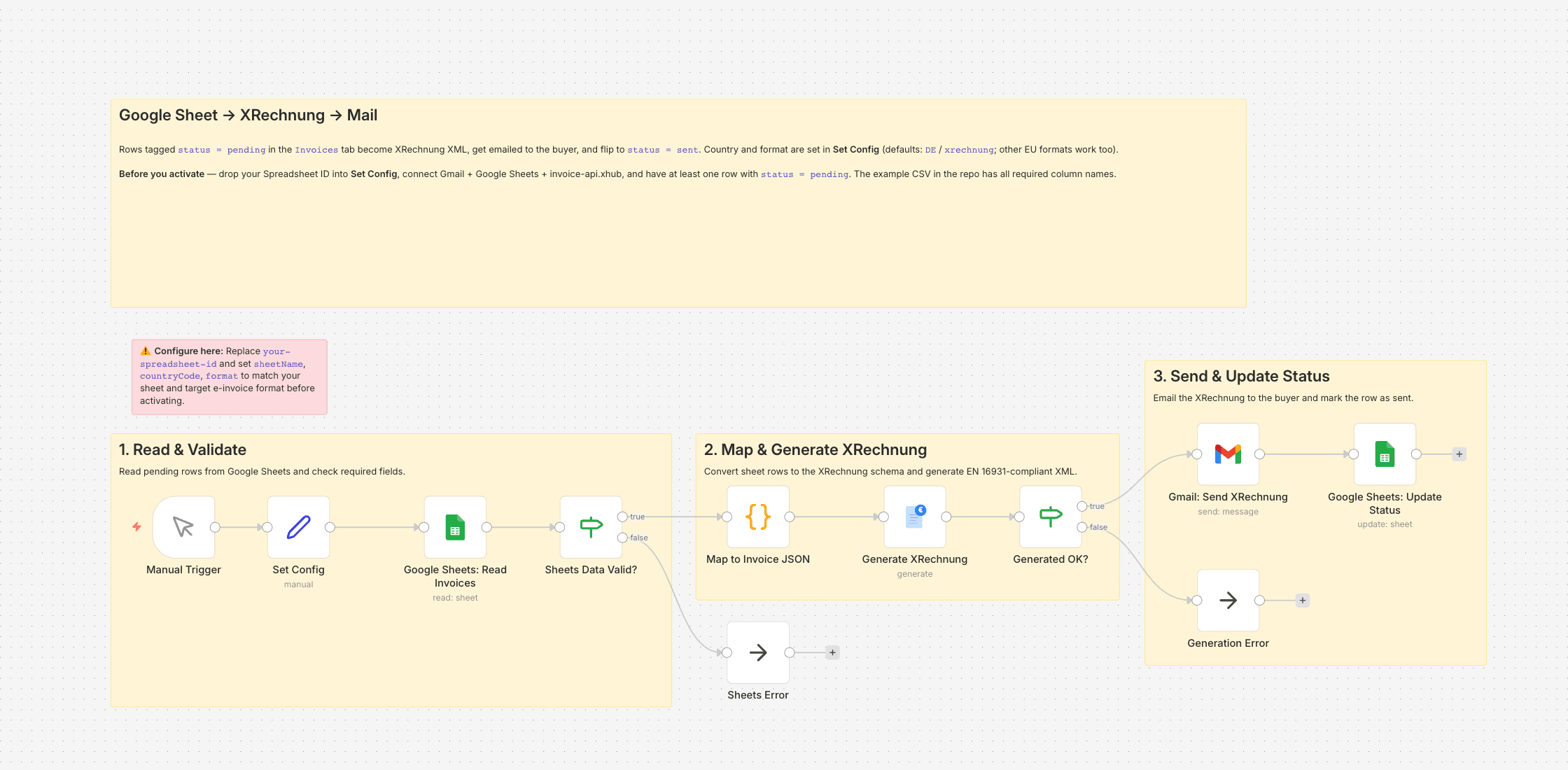
Since January 2025 our public-sector clients stopped accepting PDF invoices — they want XRechnung XML (EN 16931) or they don't pay. We're a four-person consultancy; I handle the admin side on top of my actual work, and I wasn't keen to learn a new invoicing tool just to be compliant. Our outgoing invoices have lived in a Google Sheet for years: one row per invoice, one tab per fiscal year.
This workflow reads the rows where status = pending, generates an XRechnung XML for each via invoice-api.xhub, emails it to the buyer with a short cover message, and flips the row to status = sent with a timestamp. I run it manually on the 1st and the 15th; swapping the Manual Trigger for a Schedule Trigger is a one-click change.
The Code node in the middle is the interesting bit. It maps whatever column style you use — invoiceNumber and invoice_number both work — into the JSON the API expects, and it derives net, VAT and gross from unit price × quantity × rate so I don't have to keep those columns in sync by hand. Single-line invoices fit comfortably in a row; multi-line cases need a small tweak of the mapper.
What you need
- An invoice-api.xhub API key (free sandbox keys start with
sk_test_) - A Google Sheet with the columns shown in
02-generate-xrechnung-from-sheets-example.csv— copy it into a tab namedInvoices - Gmail for the send step (any other mail integration drops in where Gmail is today)
Switching countries
Set Config has countryCode and format fields. Default is DE / xrechnung. Change to FR / facturx, IT / fatturapa, and so on — the rest of the workflow doesn't care.
Setting it up
- 1
Install the community node: n8n → Settings → Community Nodes → Install, package name `n8n-nodes-invoice-api-xhub`.
- 2
Download the template JSON and import it into n8n via Workflows → Import from File.
- 3
Connect credentials: invoice-api.xhub (API key, free sandbox available) plus the OAuth connections this template needs (Gmail, Drive, Sheets, …).
- 4
Open the `Set Config` node and paste your values (folder IDs, spreadsheet IDs, sender email, VAT ID, etc.).
- 5
Activate the workflow or run it manually — depending on the template.
We are happy to help with the integration and with n8n
Your own document layouts, a parser for your Word or Excel template, self-hosted or n8n Cloud, hand-over with an operations manual — we set the workflow up together with you or take it over entirely.
Reply within 24 hours, first call is free.