Put shipment, site or project data on the invoice document without breaking the e-invoice
What it does — reads billing rows, line items and master data from a three-sheet spreadsheet, recalculates the totals, validates and generates a ZUGFeRD invoice (PDF/A-3) with your own PDF template. The point: alongside the standard fields, a custom transport object rides along — shipment, object or project data that EN 16931 has no field for. It is not evaluated for XML generation and is available as a placeholder in the PDF template. The structured data stays fully conformant. Setup ~15 minutes.
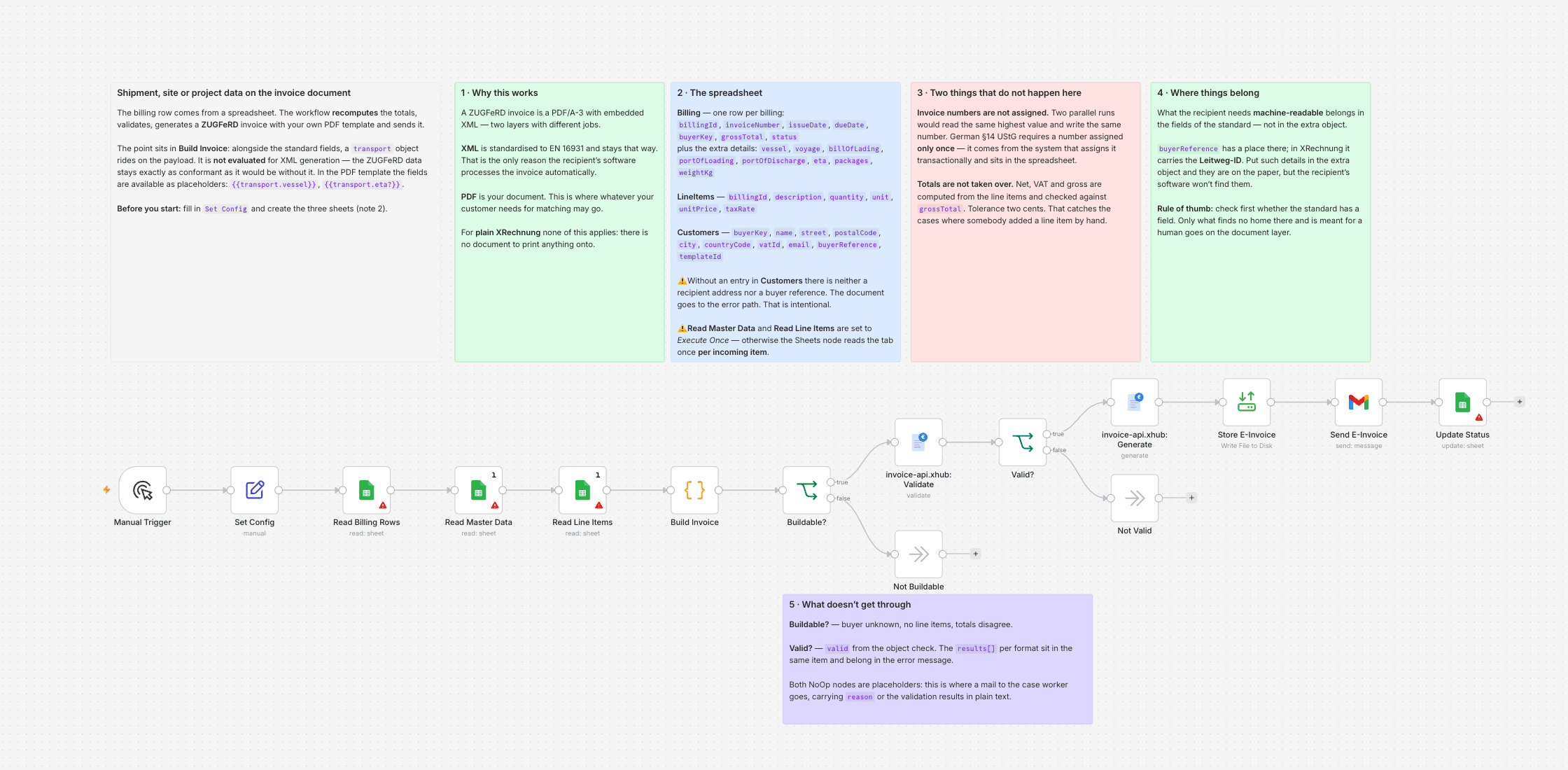
We invoice ocean freight. Our invoices have always carried the vessel name, voyage number, bill of lading and port of discharge — not out of nostalgia, but because our customer's accounts payable has no way of telling which shipment an invoice belongs to without them. When we moved to ZUGFeRD, my first worry wasn't the standard itself. It was exactly this: if EN 16931 doesn't know these fields, do they disappear from the invoice?
They don't. A ZUGFeRD invoice is a PDF with embedded XML — two layers, two jobs. The XML is standardised and stays that way, otherwise the recipient's software can't process it automatically. The PDF is our document. This workflow uses both: the billing row comes from a spreadsheet, the shipment data rides along as its own object on the payload, and the PDF template picks it up as placeholders. The object is not evaluated for XML generation — the ZUGFeRD data is exactly what it would be without it.
The same applies to anything on your invoices that no standard covers: site and construction phase in the trades, serial number in machinery, project code and cost centre in consulting.
Two things I'd say before you import it.
What the recipient needs machine-readable does not belong in the extra object. The purchase order number and the buyer reference have a place in the standard — in XRechnung the buyer reference carries the Leitweg-ID, the routing ID for German public authorities. Put those in the extra object and they'll be on the paper, but the recipient's software won't find them. And that software is what's meant to do the matching. Rule of thumb: check first whether the standard has a field. Only what finds no home there and is meant for a human goes on the document layer.
Invoice numbers are not assigned in n8n. Two parallel runs read the same highest value from the sheet and write the same number — but German §14 UStG requires a number that is assigned only once. A duplicate is a genuine defect, and you don't notice until somebody looks systematically. So the number comes from whatever system assigns it transactionally and sits in the sheet. The workflow reads it, it doesn't invent it.
Beyond that the workflow does the obvious: pull billing rows, master data and line items from the sheet, merge them, build the payload, recompute the totals instead of trusting them, validate, generate, store, send, log. If the computed totals differ from the sheet by more than two cents, the document goes down the error path — that reliably catches the cases where somebody added a line item by hand.
The templateId sits per customer in the master data. If a key account needs its own layout, you put a different ID there; the workflow doesn't change.
What you need
- The community node
n8n-nodes-invoice-api-xhubfor validation and generation — it passes the JSON through to the API unchanged, so the extra object needs no special handling - An invoice-api.xhub API key
- A spreadsheet with three sheets: billing rows, line items, master data (buyers including
templateId) - A PDF template with a
keyvalueblock for the extra details — the placeholder reference under/docs/templatesshows the structure - A Gmail account for sending (swap in an SMTP node if you prefer), and on self-hosted n8n an output directory listed in
N8N_RESTRICT_FILE_ACCESS_TO
What it doesn't do
It doesn't work for plain XRechnung. That's an XML file — there's no document to print anything onto. If you invoice public sector bodies, find out beforehand whether those details are needed there at all or whether only a human reads them. It doesn't send via Peppol; the e-invoice goes out as a mail attachment. It doesn't check for duplicates across runs — set the same status twice and you get two invoices. And it doesn't read PDFs: the input is already structured, which is the difference to template 06.
One note: invoice templates are currently in beta. Usable and documented, but the API may still change.
Setting it up
- 1
Install the community node: n8n → Settings → Community Nodes → Install, package name `n8n-nodes-invoice-api-xhub`.
- 2
Download the template JSON and import it into n8n via Workflows → Import from File.
- 3
Connect credentials: invoice-api.xhub (API key, free sandbox available) plus the OAuth connections this template needs (Gmail, Drive, Sheets, …).
- 4
Open the `Set Config` node and paste your values (folder IDs, spreadsheet IDs, sender email, VAT ID, etc.).
- 5
Activate the workflow or run it manually — depending on the template.
We are happy to help with the integration and with n8n
Your own document layouts, a parser for your Word or Excel template, self-hosted or n8n Cloud, hand-over with an operations manual — we set the workflow up together with you or take it over entirely.
Reply within 24 hours, first call is free.