Archive inbound e-invoices from Gmail to Drive (with a searchable sheet log)
What it does — archives inbound e-invoices from Gmail into Google Drive with auto-detected XRechnung, ZUGFeRD and Factur-X format recognition, plus a searchable Google Sheets log. Runs on n8n Cloud or self-hosted in ~5 minutes.
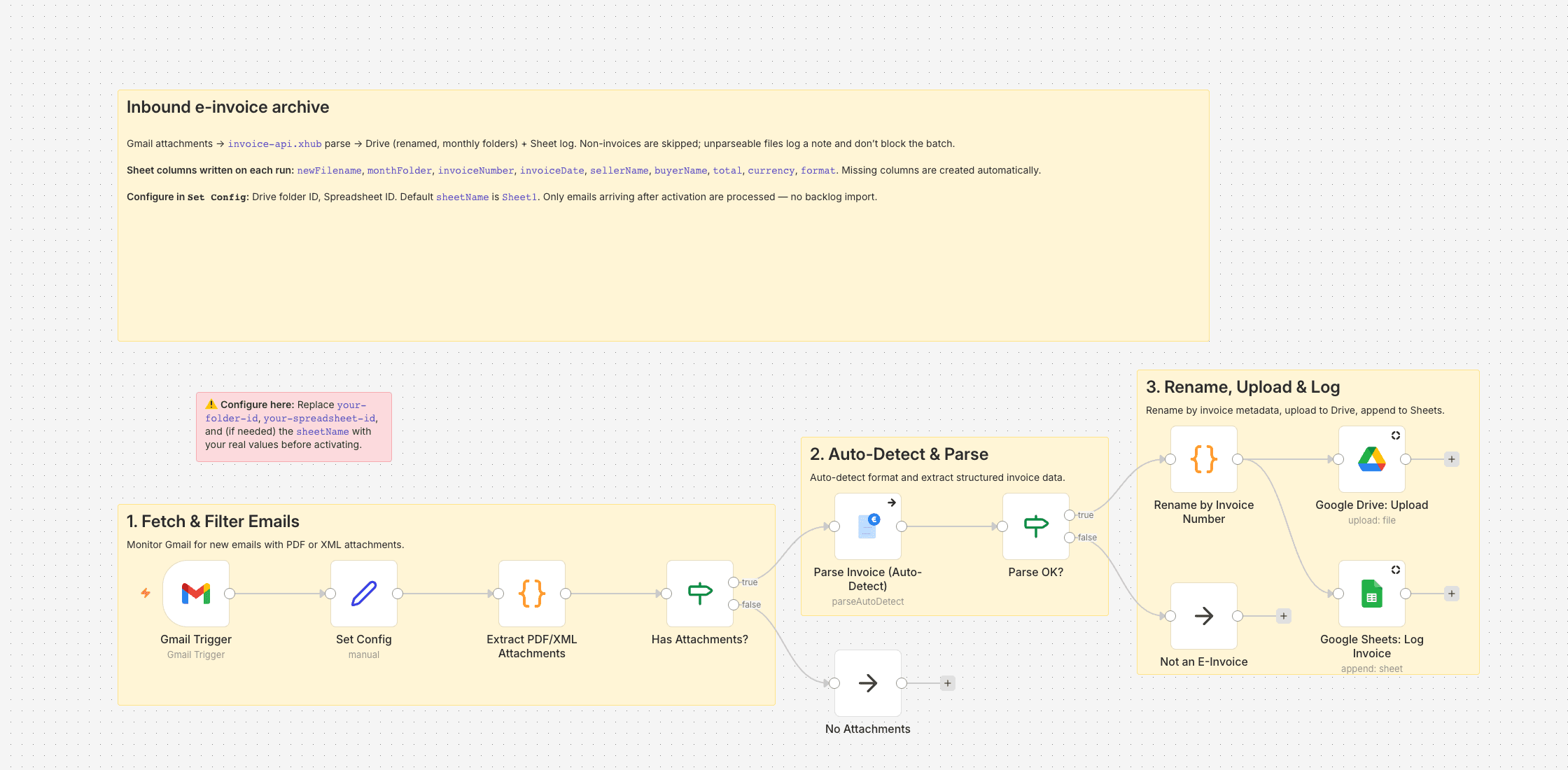
When our team passed 50 people, the supplier-invoice flow turned into a problem I couldn't keep ignoring. I'm Head of Finance at a software company; XRechnung XML from IT contractors, PDFs from the hosting provider, attachment-receipts from two dozen SaaS tools — all landing in the same shared inbox, all named invoice.pdf or attachment-2.xml. Our "archive" was a mail thread.
This workflow watches Gmail for attachments, runs everything through invoice-api.xhub to decide what actually is an e-invoice and extract the structured fields, then does two things with the ones that pass. It puts the original file into a Drive folder under YYYY-MM, renamed to YYYY-MM-DD_Seller_InvoiceNumber.ext, and it appends one row per invoice to a Google Sheet.
The sheet is the part I use most. Auto-mapped columns — newFilename, monthFolder, invoiceNumber, invoiceDate, sellerName, buyerName, total, currency, format — mean it's sortable, filterable, and I can point a pivot at it when the auditor asks for Q2 by supplier. If the sheet doesn't have a column yet, n8n creates it on the first write.
Non-invoice attachments are silently skipped. If invoice-api.xhub can't make sense of a file, the workflow logs it and moves on rather than crashing the batch.
Accounts you'll connect
- Gmail (OAuth2) — the trigger
- Google Drive (OAuth2) — target folder
- Google Sheets (OAuth2) — the log
- invoice-api.xhub — API key, free sandbox available
Four credentials is the honest trade-off of this flow. If you only want one of the two destinations (Drive or Sheets), delete the other branch.
Configuration
Open Set Config, paste the folder ID from your Drive URL and the spreadsheet ID from your Sheets URL. The sheetName defaults to Sheet1. Activate the workflow and it starts polling on the next Gmail minute.
What this workflow doesn't do
It doesn't OCR scanned PDFs, doesn't de-duplicate (forward the same mail twice and you'll see two rows), and it doesn't touch your existing backlog — only emails arriving after activation. A cron-triggered backfill is on my to-do list, but for the archive-from-now-on case this is enough.
Setting it up
- 1
Install the community node: n8n → Settings → Community Nodes → Install, package name `n8n-nodes-invoice-api-xhub`.
- 2
Download the template JSON and import it into n8n via Workflows → Import from File.
- 3
Connect credentials: invoice-api.xhub (API key, free sandbox available) plus the OAuth connections this template needs (Gmail, Drive, Sheets, …).
- 4
Open the `Set Config` node and paste your values (folder IDs, spreadsheet IDs, sender email, VAT ID, etc.).
- 5
Activate the workflow or run it manually — depending on the template.
We are happy to help with the integration and with n8n
Your own document layouts, a parser for your Word or Excel template, self-hosted or n8n Cloud, hand-over with an operations manual — we set the workflow up together with you or take it over entirely.
Reply within 24 hours, first call is free.