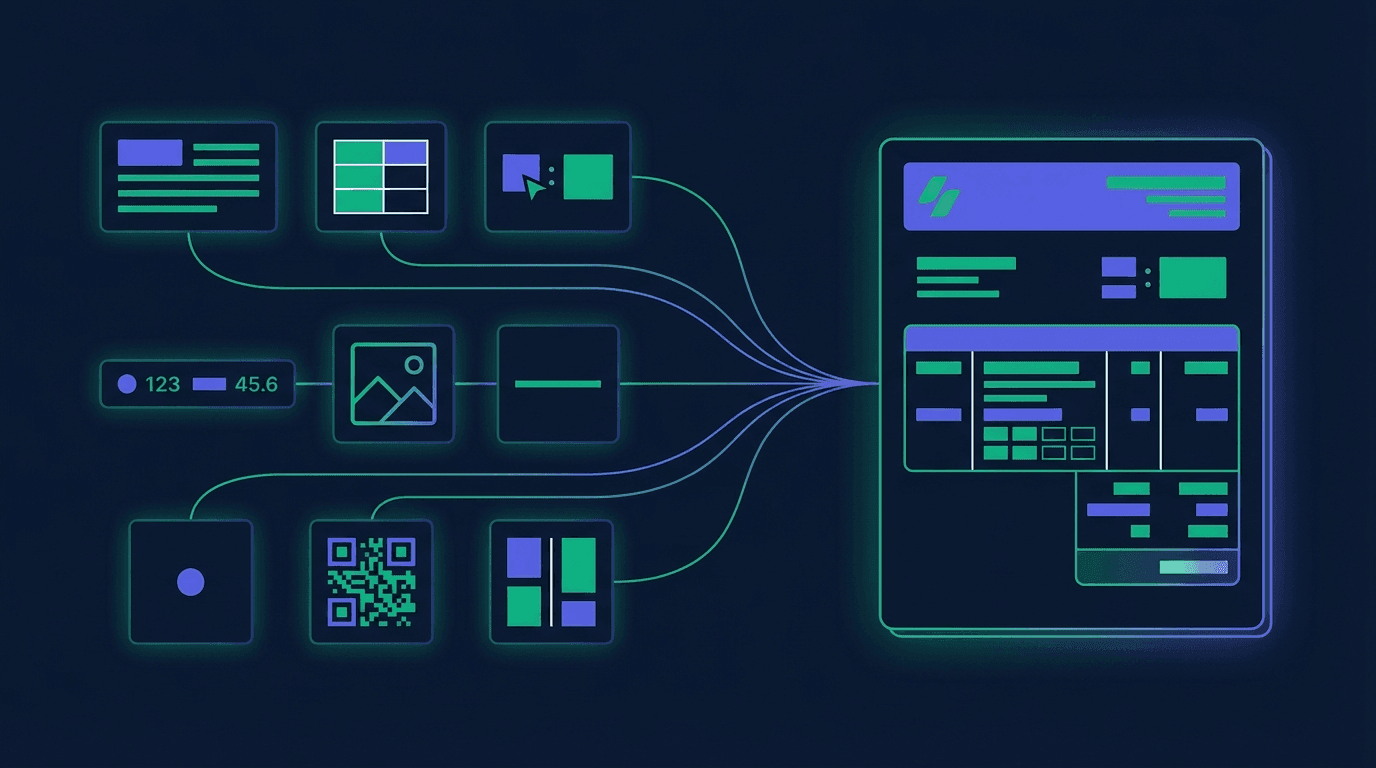
What is a template?
An invoice template is a JSON document with the fields version, name, page, body (required) and the optional fields header, footer, styles. On the/generate call, invoice data is merged into placeholders and a PDF (or PDF/A-3 with embedded ZUGFeRD XML) is produced.
17 block types
text, table, keyvalue, summary, image, spacer, line, qrcode, barcode, columns, bordered, repeater, chart, formField, toc, watermark, pageBreak — all with a {type, data} envelope, nestable via columns, bordered and repeater.
Placeholders & conditions
Flat Mustache syntax: {{invoiceNumber}}, {{seller.name}}. Suffix {{field?}} = optional. The condition property renders blocks only when values are present.
Design tokens
page.colorScheme and page.fontSizes define named tokens. Blocks reference them via { token: 'primaryColor' } instead of hex values — one tenant, one color swap.
Hybrid-compliant
The template delivers the visual layer; for ZUGFeRD the structured EN-16931 XML is automatically embedded into the PDF/A-3. What runs is the EN 16931 / BR-DE rule set against the invoice DATA — not a check that your layout actually prints a mandatory field. There is no separate § 14 UStG validation.
The 17 block types
Every block follows the envelope { type, data } and may carry an optional condition that hides the block when placeholders are empty.
| type | Purpose | Required fields in data |
|---|---|---|
text | Text section with placeholders, style, color, alignment | content |
table | Data-bound table over lists (line items, tax rows) | dataSource, columns |
keyvalue | Label/value pairs — invoice header, customer data, payment info | items[] |
summary | Totals block with dynamic VAT rows and footer total | — (typical: rows or dynamicRows) |
image | Logo or graphic (URL, Base64 or placeholder) | src |
spacer | Vertical spacing in points | height |
line | Horizontal divider with thickness and color | — |
qrcode | QR code, e.g. SEPA giro code or payment link | content |
columns | Multi-column layout, nestable blocks | columns[] |
barcode | Barcode (code128, code39, ean13, datamatrix and more) | content |
pageBreak | Page break, optionally with its own page settings | — |
chart | Bar, line or pie chart, data-bound if needed | chartType, categories, series |
formField | Fillable PDF field (text, date, checkbox, radio, signature) | fieldName, fieldType |
toc | Table of contents built from tocLevel/tocLabel of the other blocks | — |
watermark | Watermark text across the page (e.g. "Copy", "Draft") | text |
repeater | Repeat a block group per list entry, with grouping | dataPath, blocks[] |
bordered | Captioned frame around a nested block group | blocks[] |
Placeholder reference
All fields of the Creator payload are available inside the template. Mark optionality with {{field?}}. Lists are bound via dataSource to table or summary blocks. This includes objects of your own inside the payload: they are not evaluated for XML generation, but are available as placeholders in the template — nested ones with a dot, e.g. {{transport.vessel}}.
Invoice header
| Placeholder | Type | Example | Description |
|---|---|---|---|
{{invoiceNumber}} | string | INV-2026-042 | Invoice number (§ 14 UStG) |
{{issueDate}} | date | 2026-04-14 | Issue date |
{{dueDate}} | date | 2026-05-14 | Due date |
{{currency}} | string | EUR | ISO 4217 |
{{subtotal}} / {{total}} | number | 1500.00 / 1785.00 | Net resp. gross total |
Seller / Buyer (identical structure)
| Placeholder | Type | Example | Description |
|---|---|---|---|
{{seller.name}}, {{buyer.name}} | string | ACME GmbH / Kunde AG | Company name (required) |
{{seller.street}}, {{buyer.street}} | string | Hauptstr. 1 | Street (required) |
{{seller.postalCode}}, {{buyer.postalCode}} | string | 10115 | Postal code (required) |
{{seller.city}}, {{buyer.city}} | string | Berlin | City (required) |
{{seller.countryCode}}, {{buyer.countryCode}} | string | DE | ISO 3166-1 alpha-2 (required) |
{{seller.vatId?}}, {{buyer.vatId?}} | string | DE123456789 | EU VAT ID, optional |
{{seller.taxId?}}, {{buyer.taxId?}} | string | 12/345/67890 | National tax number, optional |
{{seller.bankAccount.iban?}}, {{buyer.bankAccount.iban?}} | string | DE89… | IBAN (seller: required for SEPA credit transfer; buyer: required for SEPA direct debit) |
… | — | — | Additional fields on both: tradingName, additionalStreet, state, email, phone, website, bankAccount.bic/bankName/accountHolder — see placeholder reference. |
Data sources for table / summary
| Placeholder | Type | Example | Description |
|---|---|---|---|
{{items}} | array | — | Line items (dataSource for the table block) |
{{taxSummary}} | array | — | Tax rows (dataSource for summary.dynamicRows) |
item.field | any | description, quantity, netAmount, … | Column binding via the field prop in table.columns |
Using a template
Templates are passed directly to /api/v1/invoice/{countryCode}/{format}/generate — either by templateId (UUID of a stored template) or inline via formatOptions.template. Priority: templateId > formatOptions.template > default.
By templateId
Create once in the console or via pdf.templateCreate, then send only the UUID per request.
1curl -X POST \2 https://service.invoice-api.xhub.io/api/v1/invoice/de/zugferd/generate \3 -H "Authorization: Bearer $XHUB_API_KEY" \4 -H "Content-Type: application/json" \5 -d '{6 "templateId": "b3c9a0d8-4f2e-4a1c-9e87-0d2f1a5b6c7d",7 "invoice": { /* ... invoice payload (Creator API) ... */ }8 }'Inline BlockTemplate
Send the template JSON directly with the request — useful for tests, CI pipelines or dynamically generated layouts.
1curl -X POST \2 https://service.invoice-api.xhub.io/api/v1/invoice/de/zugferd/generate \3 -H "Authorization: Bearer $XHUB_API_KEY" \4 -H "Content-Type: application/json" \5 -d '{6 "invoice": { /* ... */ },7 "formatOptions": {8 "template": { /* inline BlockTemplate JSON */ }9 }10 }'Go deeper
Detailed references, branding recipes and compliance guide.
Placeholder reference
All fields from the Creator payload — header, seller, buyer, line items, tax rows.
Branding
Logo, colors via design tokens, header/footer, named styles.
Compliance
§ 14 UStG required fields, format matrix for XRechnung / ZUGFeRD / Peppol.
Cookbook
SEPA QR, discount column, page numbers, dynamic VAT rows — copy-ready.