WooCommerce order → XRechnung → email the buyer, note the order
What it does — converts every new WooCommerce order into an EN 16931-compliant XRechnung XML attachment, emails it to the billing address, and notes the order internally. Single VAT-rate catalogues only. Setup ~10 minutes.
My shop sells lab consumables — pipette tips, reagent bottles, filter papers — mostly to university institutes, clinics, and the occasional research foundation. They're all publicly funded, and since early 2025 their procurement desks have been bouncing our order-confirmation emails because a plain PDF isn't a compliant e-invoice any more. Support tickets were piling up. This workflow is how I cleared them.
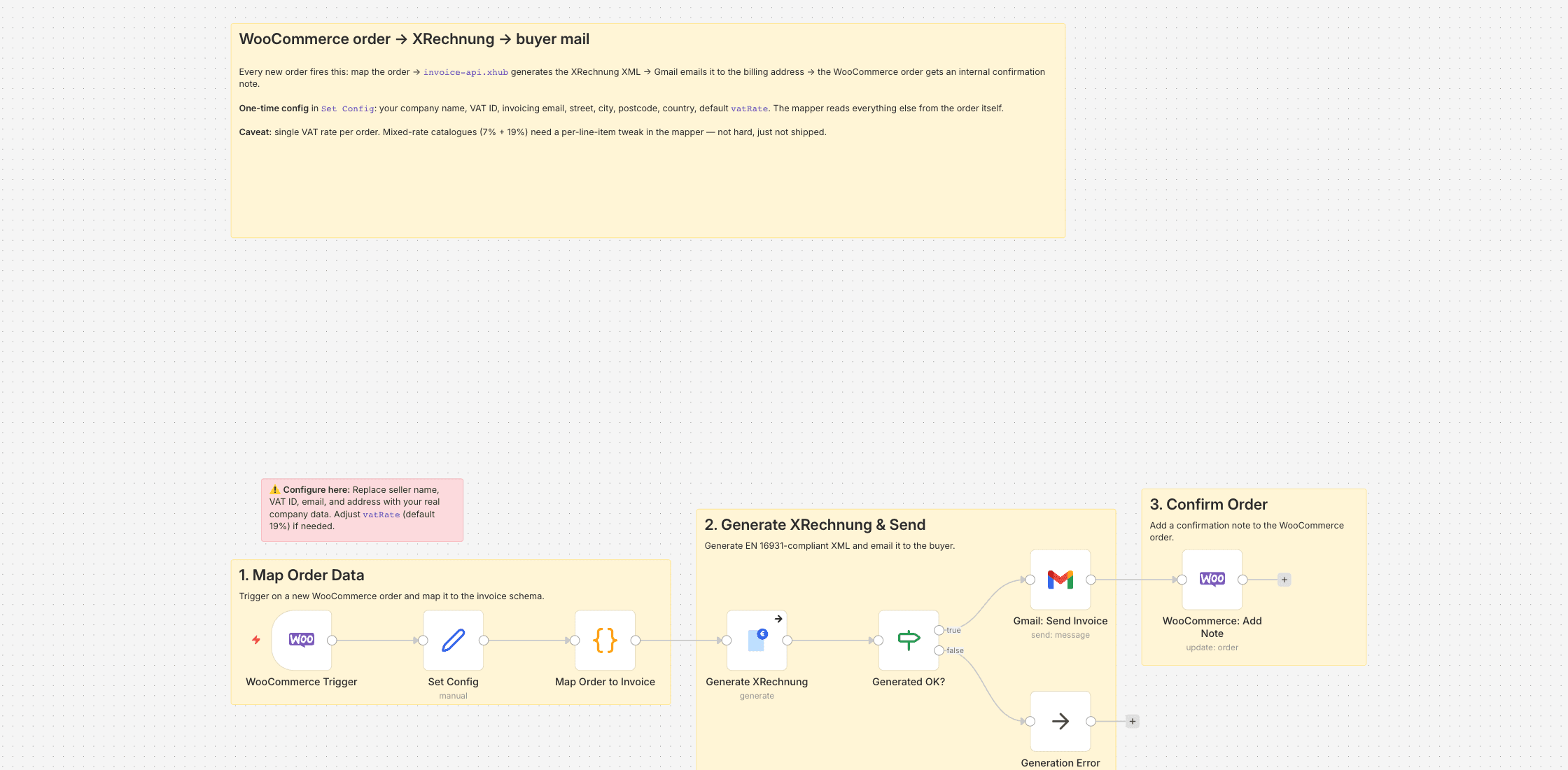
Every new WooCommerce order triggers the flow. A Code node maps the order — line items, billing address, currency, totals — into the JSON invoice-api.xhub expects, the API generates the XRechnung XML, Gmail attaches it to a short mail to the billing email, and an internal note is added to the WooCommerce order so my future self knows the XRechnung went out.
The one-time config lives in Set Config: your company name, VAT ID, invoicing email, street, city, postcode, country, and the default VAT rate. I left vatRate at 19 because it covers most of my catalogue — see Limitations below if yours is mixed.
Connecting WooCommerce
You need the REST API credentials from the shop (WooCommerce → Settings → Advanced → REST API, Consumer Key / Secret). Read access is enough: this workflow only reads the order for mapping, and the confirmation note is written via the n8n WooCommerce node rather than a raw API call.
Limitations
Single VAT rate per order. If your catalogue mixes 7% and 19% — books, food, printed matter — this template flattens them to one rate, which is wrong for a proper XRechnung. The fix is small (derive vatRate per line item instead of from Set Config), but I didn't need it and so didn't build it. Reduced-rate and reverse-charge scenarios aren't modelled either; those tend to want a human in the loop anyway.
Setting it up
- 1
Install the community node: n8n → Settings → Community Nodes → Install, package name `n8n-nodes-invoice-api-xhub`.
- 2
Download the template JSON and import it into n8n via Workflows → Import from File.
- 3
Connect credentials: invoice-api.xhub (API key, free sandbox available) plus the OAuth connections this template needs (Gmail, Drive, Sheets, …).
- 4
Open the `Set Config` node and paste your values (folder IDs, spreadsheet IDs, sender email, VAT ID, etc.).
- 5
Activate the workflow or run it manually — depending on the template.
We are happy to help with the integration and with n8n
Your own document layouts, a parser for your Word or Excel template, self-hosted or n8n Cloud, hand-over with an operations manual — we set the workflow up together with you or take it over entirely.
Reply within 24 hours, first call is free.