Turn the PDF invoices your departments already write into ZUGFeRD or XRechnung
What it does — reads the PDF invoices your departments already write in Word or Excel from one mailbox per department, rebuilds them as EN 16931 with rules (no LLM), validates them and generates ZUGFeRD (PDF/A-3) or XRechnung. Buyer e-mail and Leitweg-ID come from a customer table, everything else from the document. Setup ~20 minutes.
VIDEO WALKTHROUGH
The template on video
I run the back office of a facility services company with two operating departments. Both write their invoices in Word — the same templates for fifteen years, tab stops and all — export to PDF and mail them out. When our biggest customer announced that from next year they'd only accept e-invoices, the first quotes I got were for replacing the whole invoicing process. Nobody in the departments wanted that, and honestly, neither did I.
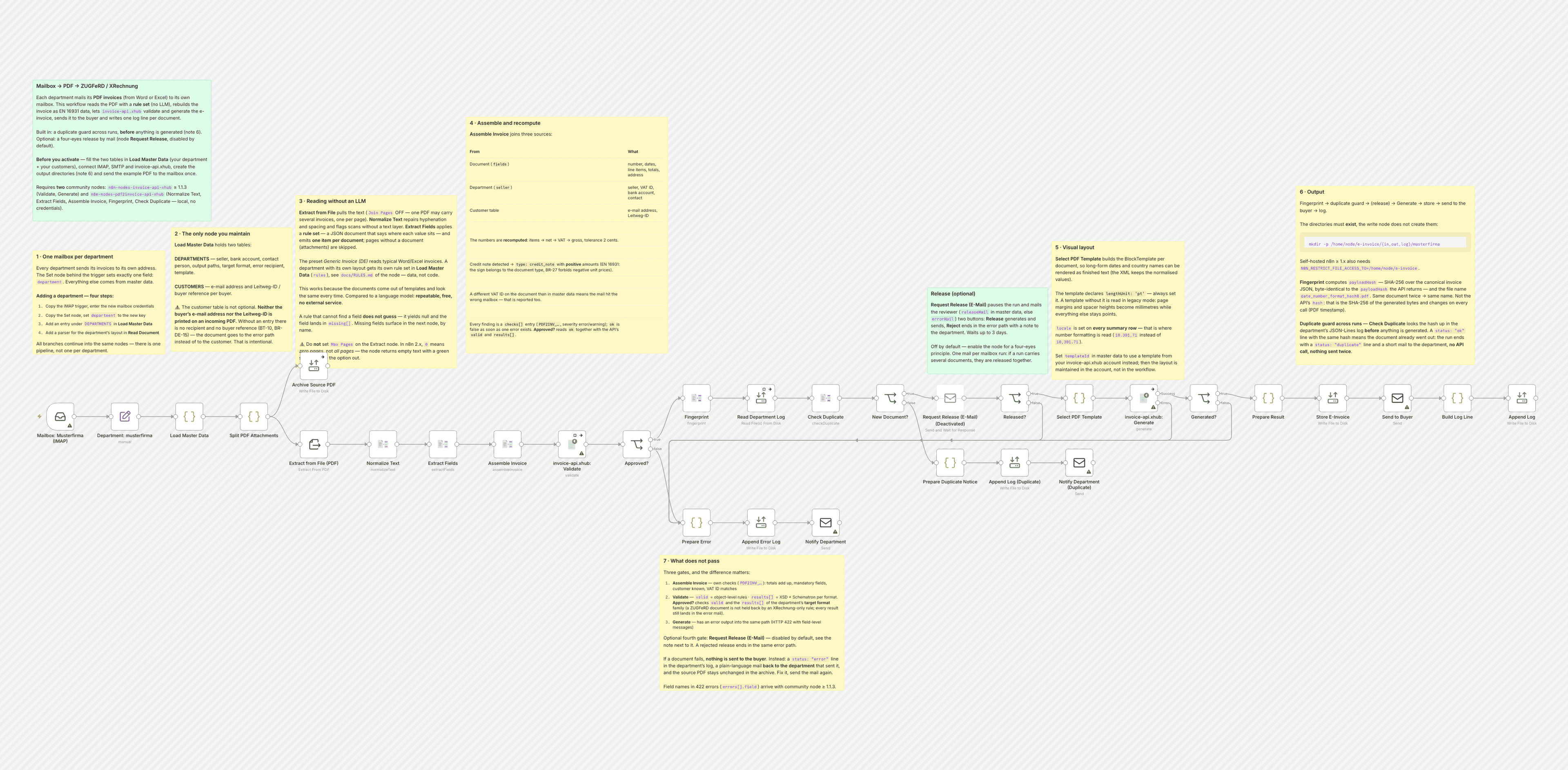
So the departments keep their Word templates. What changed is the address they send the PDF to. Each department has its own mailbox now; this workflow watches it, pulls the text out of the PDF, reads the invoice with a small rule set — number, dates, line items, totals, the address block; a JSON file, not code — and hands the result to invoice-api.xhub, which validates it and generates a ZUGFeRD PDF/A-3 (or XRechnung, chosen per department). The e-invoice goes to the buyer, the source PDF goes into an archive folder, and one JSON line goes into a log file I can grep.
Two things I'd point out before you import it.
The customer table in Load Master Data is not optional. It took me an afternoon to accept that neither the buyer's e-mail address nor their Leitweg-ID is anywhere on our invoices — they never had to be. So you maintain a small table: buyer name as printed, e-mail, Leitweg-ID. A buyer who isn't in it stops in the check and I get a mail. That's deliberate.
And there is no AI in here. I tried an LLM first. It read the invoices fine, and once in a while it read them slightly wrong, which for invoices is the worst possible failure mode. Our PDFs come out of the same Word templates every time, so a rule set is enough, it costs nothing per document, and the same file gives the same result every run. If a department changes its template, the rules break loudly — the document lands in the error path with a mail back to the sender — and I adjust three lines in a JSON file. I'll take that over silent almost-right.
What you need
- Two community nodes:
n8n-nodes-invoice-api-xhub(version 1.1.3 or newer — older ones swallow the field name on a 422) for validating and generating, andn8n-nodes-pdf2invoice-api-xhubfor reading the PDF text, assembling the invoice and the duplicate guard — it runs locally and needs no credentials n8n-nodes-pdf2invoice-api-xhubis not published on npm yet (checked 2026-09-15): "Settings → Community Nodes → Install" cannot find it today, and without it importing this workflow fails with "unknown node". The source is public at github.com/xhubio/n8n-nodes-pdf2invoice-api-xhub — until it is published you build it there yourself and drop it into~/.n8n/nodeson a self-hosted instance; n8n Cloud cannot do that- An invoice-api.xhub API key
- IMAP credentials for each mailbox and SMTP for sending
- On self-hosted n8n, the output directories from master data have to exist and be in
N8N_RESTRICT_FILE_ACCESS_TO
What it doesn't do
No OCR — a scanned PDF is detected and rejected with a clear reason. No Peppol — the e-invoice goes out as a mail attachment. The four-eyes release (Request Release by mail, two buttons) is there but switched off by default; turn the node on if someone should approve before anything leaves. What it does do since the last revision: a duplicate guard — the same document arriving twice is recognised by its content hash in the department's log before anything is generated, and is not sent a second time. And the rule set shipped here reads the example PDF; you will adapt the patterns to your own layout, which is the whole idea.
Setting it up
- 1
Install the community node: n8n → Settings → Community Nodes → Install, package name `n8n-nodes-invoice-api-xhub`.
- 2
Download the template JSON and import it into n8n via Workflows → Import from File.
- 3
Connect credentials: invoice-api.xhub (API key, free sandbox available) plus the OAuth connections this template needs (Gmail, Drive, Sheets, …).
- 4
Open the `Set Config` node and paste your values (folder IDs, spreadsheet IDs, sender email, VAT ID, etc.).
- 5
Activate the workflow or run it manually — depending on the template.
We are happy to help with the integration and with n8n
Your own document layouts, a parser for your Word or Excel template, self-hosted or n8n Cloud, hand-over with an operations manual — we set the workflow up together with you or take it over entirely.
Reply within 24 hours, first call is free.