Bulk-parse inbound e-invoices from Gmail into a flat Google Sheet
What it does — bulk-parses inbound e-invoices from a Gmail mailbox into a flat Google Sheet with ~25 columns per invoice, ready for DATEV export. Runs on demand via manual trigger. Setup ~5 minutes.
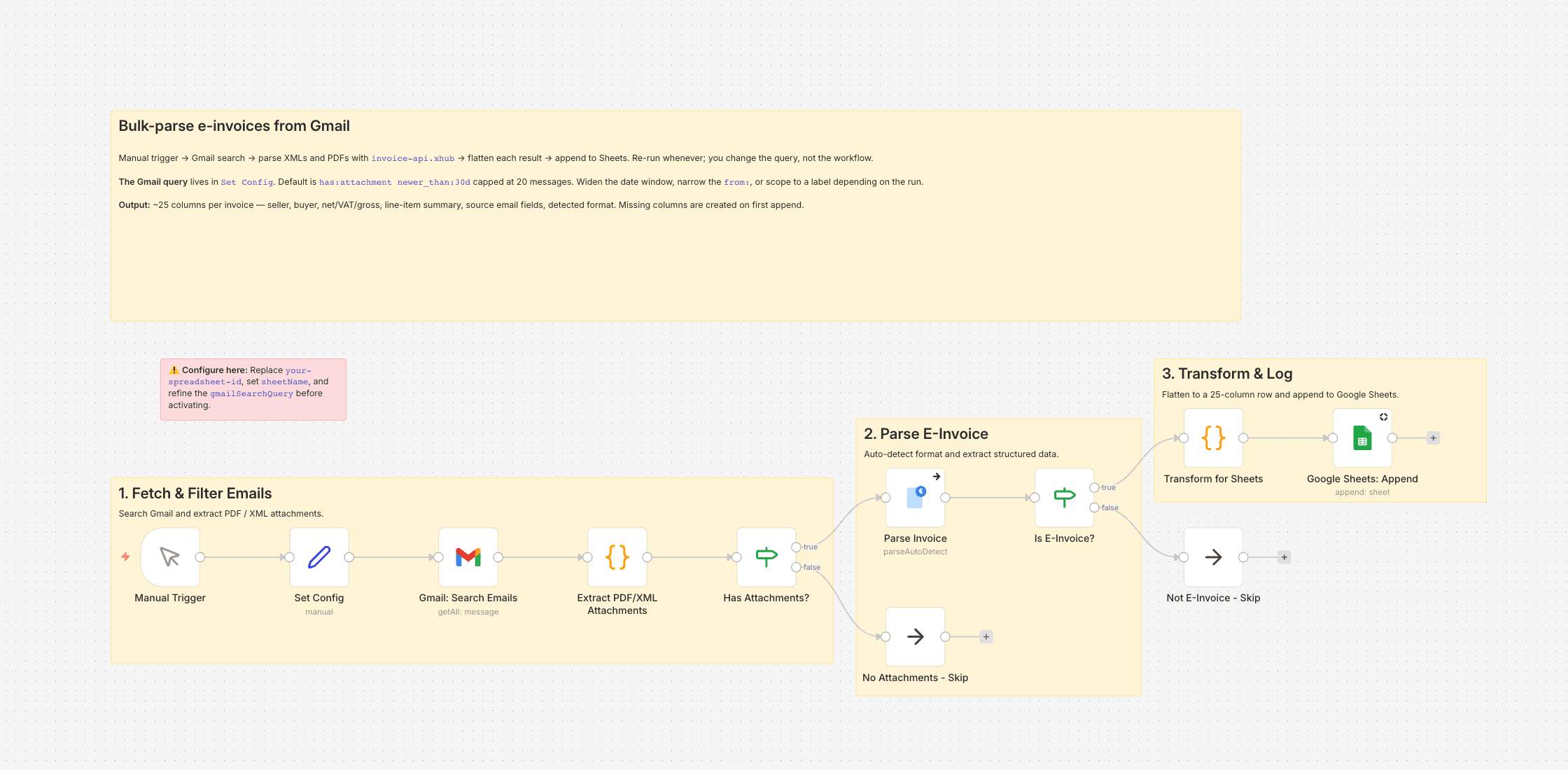
Between Christmas and mid-January I was out for three weeks, and the supplier invoices for three of my clients had been stacking up in their inboxes — roughly a hundred and eighty attachments. I'm a freelance bookkeeper; I prep their data for DATEV. Opening each PDF, typing invoice numbers, net amounts and VAT rates into a spreadsheet isn't twelve hours for me, it's closer to two days. That backlog pushed me to build this.
The workflow runs on demand: it searches a Gmail mailbox for messages matching a query I give it (typically something like has:attachment newer_than:30d), pulls out the XML and PDF attachments, asks invoice-api.xhub to parse whatever is actually an e-invoice, flattens each parsed result into a wide row, and appends the rows to a Google Sheet I keep per client.
The Gmail query is the knob I turn most. The default is the last twenty matching messages — enough for a morning's backlog. For a quarter's worth I bump the cap, narrow the from: to a specific supplier, or scope to a Gmail label. The flow is a manual trigger by design: I run it, watch the rows land, then switch to the sheet.
What ends up in the sheet
Around 25 columns per invoice: invoice number, dates, seller and buyer (name, VAT ID, address, IBAN), net / VAT / gross, currency, the first five line items collapsed into a summary, detected format, source email subject/sender/date, and a processing timestamp. Missing columns are auto-created on first run, so starting with an empty tab called Invoices is fine.
Non-invoice attachments — a contract PDF, a scanned expense receipt — are skipped rather than produce garbage rows.
From the sheet onward
For DATEV I export the sheet to CSV and use the import assistant. For ad-hoc checks I filter in Sheets directly. If you'd rather land the rows in Postgres or an ERP, swap the final Google Sheets node — everything upstream stays the same.
Setup
Install n8n-nodes-invoice-api-xhub, add the credential (free sandbox keys available), connect Gmail and Google Sheets, paste your spreadsheet ID into Set Config. No activation needed — execute the workflow when you want it to run.
Setting it up
- 1
Install the community node: n8n → Settings → Community Nodes → Install, package name `n8n-nodes-invoice-api-xhub`.
- 2
Download the template JSON and import it into n8n via Workflows → Import from File.
- 3
Connect credentials: invoice-api.xhub (API key, free sandbox available) plus the OAuth connections this template needs (Gmail, Drive, Sheets, …).
- 4
Open the `Set Config` node and paste your values (folder IDs, spreadsheet IDs, sender email, VAT ID, etc.).
- 5
Activate the workflow or run it manually — depending on the template.
We are happy to help with the integration and with n8n
Your own document layouts, a parser for your Word or Excel template, self-hosted or n8n Cloud, hand-over with an operations manual — we set the workflow up together with you or take it over entirely.
Reply within 24 hours, first call is free.