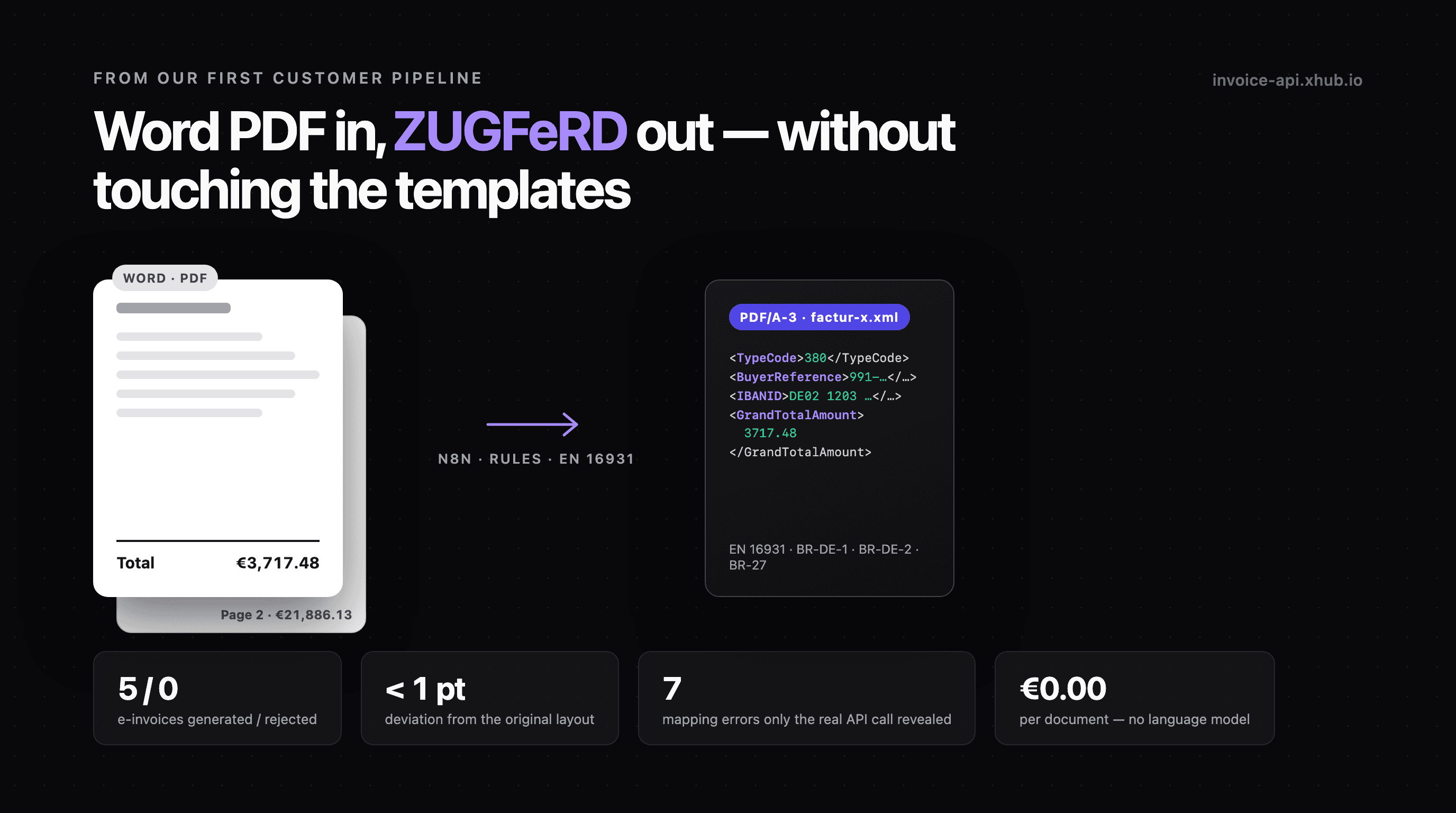
One PDF, two invoices. Page 1 carried an invoice for €3,717.48, page 2 one for €21,886.13. An automation that assumes "one PDF = one invoice" would have lost the second without an error message. That was one of the four test files we ran through our first customer pipeline against the real API — and the moment it became clear that the interesting problems are not in generating the e-invoice, but before it.
This post is the report from that pipeline: what we built, what we tore out again, which seven errors only the real API call revealed — and what a customer taught us about our own API.
The starting point
The customer is a facility services company with two departments. Both have written their invoices in Word and Excel for years, each with its own template, and sent them as PDFs. From 2027 they must send e-invoices — ZUGFeRD to companies, XRechnung to public-sector buyers.
What the customer did not want: touch the templates, roll out new invoicing software, retrain the departments. The invoices already exist. Just in the wrong format.
So we built a pipeline behind the existing process. Each department sends its PDF invoice as before — only not to the customer, but to its own mailbox. From there, n8n takes over.
The pipeline in one paragraph
Mailbox per department (IMAP) → split PDF attachments → archive the source PDF → extract text → read it rule-based → build the EN 16931 record and recompute the totals → validate with the invoice-api → approve → generate the e-invoice → store → send to the buyer → one log line. Anything that fails goes into an error path that mails back to the department — never to the buyer.
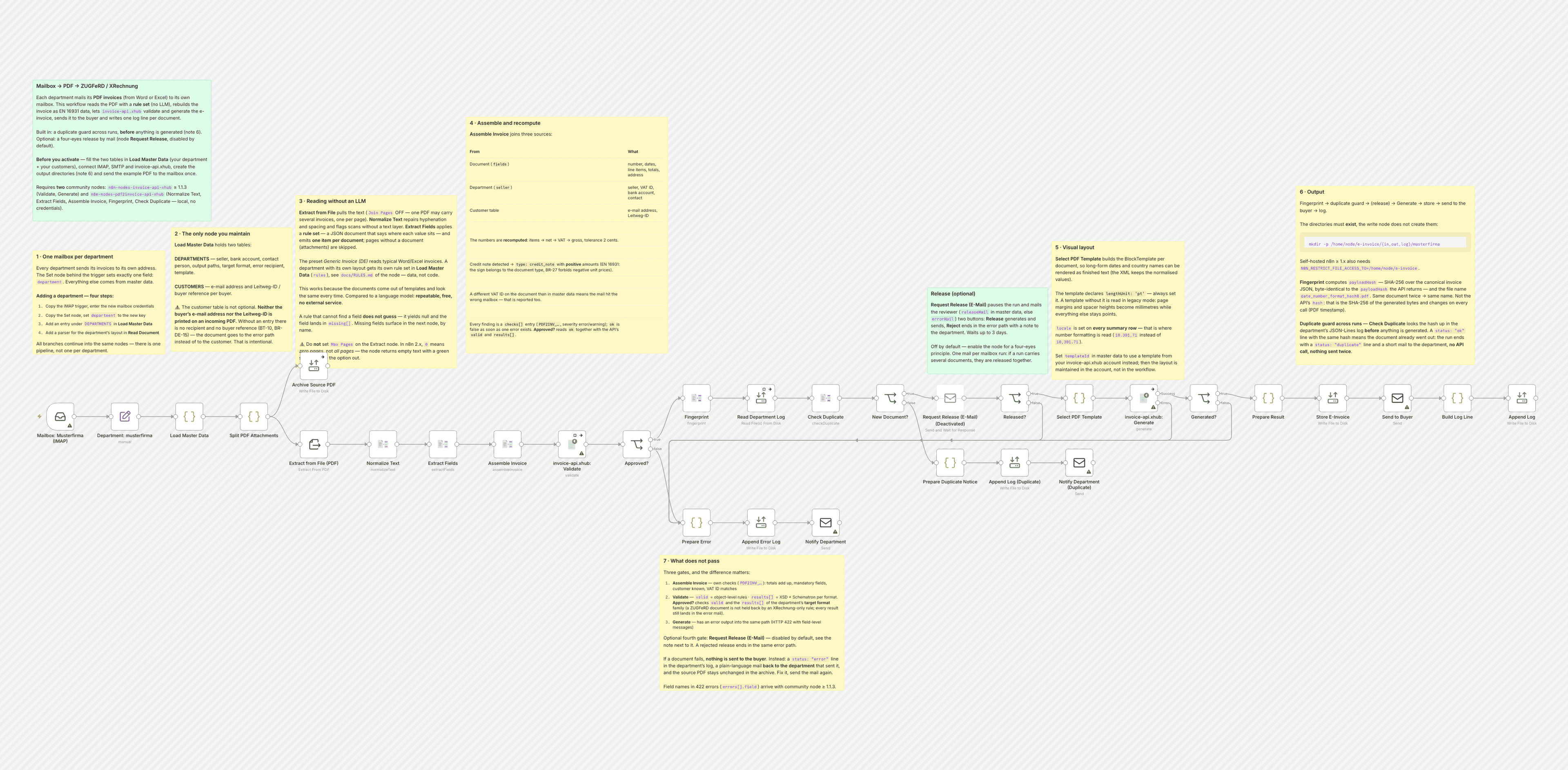
The pipeline is available as an n8n template to import — anonymised, with a sample company and a synthetic test document. The image is available at full resolution.
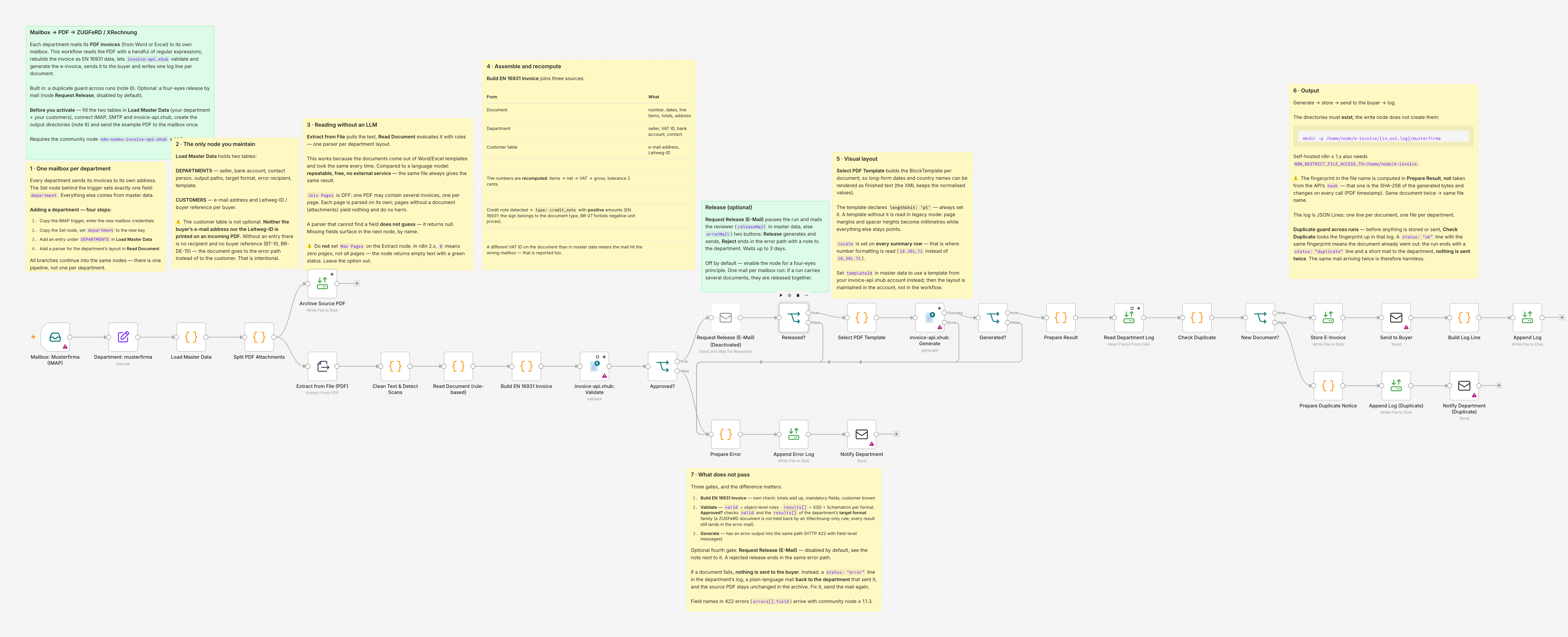
Why no language model
Version 1 of the pipeline had a language model in it: PDF text in, JSON out, temperature 0, fixed schema. Version 2, three days later, did not. Three reasons, and cost was the smallest:
- The PDFs are uniform. They come from Word and Excel templates. Invoice number, date, line items and totals sit in the same place every time. Regular expressions read that deterministically — the same file always yields the same result. A language model pays off with changing third-party layouts. With your own templates it is a source of errors that sends you a bill.
- No external service, zero cents per document. The pipeline has no internet dependency other than the invoice-api itself.
- n8n 2.x refuses to activate a workflow while any node lacks credentials — even on a branch that never runs. The LLM branch without an API key blocked the entire workflow. Out it went.
What remained is a contract that turned out to be the most important thing in the whole pipeline: A parser that cannot find a field returns null. It does not guess. What is missing surfaces in the downstream check and is named. If a department changes its Word template, the parser breaks — loudly, not silently. The document lands in the error path, the department gets an e-mail.
What is not on the PDF
We checked all four test documents for it: Neither the buyer's e-mail address nor their Leitweg-ID (the German routing ID) appears on a conventional invoice. Neither ever had to. An e-invoice needs both — the address for delivery, the Leitweg-ID as the buyer reference (BT-10), which Germany requires in both formats, not just XRechnung.
That is why the pipeline has a customer table: buyer name as printed, e-mail address, Leitweg-ID. Without an entry there is no recipient. The document stops, the department gets feedback. That is deliberate — better an e-mail to the department than an undeliverable e-invoice.
Add the master data per department: bank account (BR-DE-1 requires payment details), contact person with phone and e-mail (BR-DE-2), VAT ID. All of that is on the letterhead, but in no data record.
The customer table is the most important table in the pipeline, and it is printed on no document. Anyone planning such a pipeline should ask the customer for it first.
Three validation stages — and why the distinction matters
Before an e-invoice goes out, it has to pass three gates:
| Stage | Who checks | What |
|---|---|---|
| 1 | The pipeline itself | Line items → net → VAT → gross with 2 cent tolerance; mandatory fields; buyer in the customer table; VAT ID on the document = VAT ID of the department |
| 2 | /validate → valid | Object-level rules: mandatory fields, totals, identifier formats |
| 3 | /validate → results[] | Per target format, the generated XML checked against XSD and Schematron — the rules a recipient actually rejects on |
The point we ourselves understood late: valid and results[] are two answers. An invoice can be valid: true and still fail BR-DE-15 in results[0].valid: false. Our first approval gate checked only valid. Now it requires both. Anyone gating on valid alone sees format violations only at generation time — or never.
The VAT ID comparison in stage 1, by the way, is not a rounding guard but a mailbox detector: if a document carries a different VAT ID than the department, the e-mail went to the wrong mailbox.
The seven mapping errors
This is the part we could not have written down beforehand. Our own schema check was green. The API rejected the document anyway — seven times, and rightly so each time:
| # | What we had | What is correct |
|---|---|---|
| 1 | type: "creditnote" | credit_note — the valid values are invoice, credit_note, proforma, correction |
| 2 | dueDate omitted when the document names none | dueDate is mandatory; the fallback is the issue date, not omission |
| 3 | countrySpecific: { buyerReference } | countrySpecific.countryCode: "DE" is mandatory — without it the group is silently discarded, and the Leitweg-ID with it |
| 4 | paymentMeans: { iban, bic } | Does not exist. Bank details belong on seller.bankAccount |
| 5 | No contact person | BR-DE-2: seller.contact with name, phone, e-mail |
| 6 | Bank account alone | BR-DE-1: additionally paymentMethods: [{ type: "bank_transfer" }] — and paymentTerms without text violates PEPPOL-EN16931-R008 |
| 7 | Negative unit prices on the credit note | BR-27 forbids them — the document type carries the sign |
The lesson is not a list but a method: The test run against the real API is the test. Not the schema, not the mock. All four sample PDFs went through the workflow's nodes and were validated and generated against the production API — not simulated. The result: 5 e-invoices from 4 PDFs, 0 rejected, each a PDF/A-3 with an embedded factur-x.xml.
Credit notes: the document type carries the sign
One of the four test documents was a credit note for €2,130.49 at 7 % VAT instead of 19 %. On the PDF it shows negative amounts. Passed through as an invoice, it would have become a receivable — at the wrong tax rate.
EN 16931 solves this differently from the look of the document: the type is credit_note, all amounts are positive, quantity and unit price too. Anyone passing the numbers straight from the PDF produces a document that looks structurally clean and fails BR-27. The pipeline detects the credit note on the document, flips the sign and sets the type.
One more detail from the same document: the line items in the attachment added up to €1,967.32, the stated amount was €1,991.11 — a €23.79 difference. We deliberately did not recompute the attachment, but created one summary line for the stated amount and reported the difference. Where it comes from is for the customer to clarify. A pipeline that waves everything through is not automation, it is a faster way to send errors.
One PDF, two invoices
Back to the test file from the beginning. Two invoices, one per page. The solution is unspectacular: read the PDF text page by page (in n8n: Join Pages off), send each page through the parser individually. Pages without a document — attachments, terms — yield nothing and do no harm.
The opposite direction matters just as much: two of the four test files contained the same document. Both produce the same file name and overwrite each other harmlessly instead of creating a duplicate. That works through a fingerprint over the invoice data with a stable key order — and explicitly not through the hash the API returns with the document.
Why not? Because that hash is the hash of the output bytes. A PDF carries a creation timestamp, so the value changes with every call, even for identical input. As a duplicate marker it is useless. That was documented nowhere — which brings us to the last section.
What the pipeline taught us about our own API
The first customer is the best test you could not write yourself. Three things we found were in no documentation — including ours:
- The
hashin the response is a byte hash of the document, so for PDF it is not stable across calls. That is now in the API description, and the response additionally carries apayloadHashover the input data — that is the one you need for idempotency. - Our template documentation said "in points", but without the
lengthUnitfield the renderer read page margins and spacer heights as millimetres — a historically grown contract that was documented internally and not externally.lengthUnitis now in the OpenAPI, including the rule for legacy templates. - Our n8n community node showed only "Request failed with status code 422" — the field name from the API response (
seller.bankAccount.bankName) was lost. Since version 1.1.3 it comes through, and a workflow's error path receiveserrors[]in machine-readable form.
All three are fixed. And all three would still be there without a customer using the API in a real pipeline.
What the pipeline cannot do
Honesty is part of it:
- Scanned PDFs without a text layer go into the error path. No OCR built in.
- If a department changes its Word template, its parser breaks. Visibly, not silently — but someone has to update it.
- No duplicate protection across runs. The same e-mail twice means the same e-invoice twice to the buyer. Storage overwrites cleanly, sending does not.
- No human approval. Whatever passes the three stages goes out. A Wait node with an approval e-mail would be the thing to insert.
Build it yourself
The pipeline is available as an n8n template: sample company, generic parser, all three validation stages, error path, fingerprint. Import, enter master data, connect the mailbox, send one document through.
The seven mapping errors with rule IDs and corrections are covered in detail in the knowledge guide From PDF invoice to e-invoice.
And if your templates look different from ours — they always do — get in touch. Connecting a department is an afternoon's work once you know the traps.