
A question that comes up more often than you would expect:
"If we switch to e-invoicing — will our customers lose the details they need to match the invoice at all?"
This time it came from a company in ocean freight. Their invoices carry vessel name, voyage number, bill of lading, port of loading and discharge, number of packages and weight. Their customer needs exactly those details to match the invoice to the right shipment. Without them the invoice is formally impeccable and practically useless — it sits there until somebody asks.
None of those fields exist in EN 16931. The standard describes an invoice, not a sea freight consignment.
The pattern isn't limited to logistics. It hits anyone who carries industry-specific data on their invoices:
- Trades and construction: site, construction phase, the client's job number
- Machinery: serial number, machine number, service interval
- Agencies and consulting: project code, the client's cost centre, sprint number
- Wholesale: delivery note number, batch, unloading point
The worry behind the question is legitimate: does the switch force me into a straitjacket?
The short answer is no. The slightly longer one explains why — and where the boundary actually runs.
Why the standard doesn't have these fields
It's tempting to read this as a gap. It's a design decision.
EN 16931 defines a semantic data model: a fixed set of business terms with unambiguous meaning, so that any receiving software in Europe can process any invoice without prior arrangement. That is precisely the value. A standard that let everyone add arbitrary fields of their own would no longer be a standard — every recipient would be back to onboarding every sender individually. Which is the exact situation e-invoicing is meant to replace.
The price: your industry data isn't in the model. That's the purpose, not an oversight.
But it does not follow that those details have to disappear from the invoice.
A hybrid e-invoice has two layers
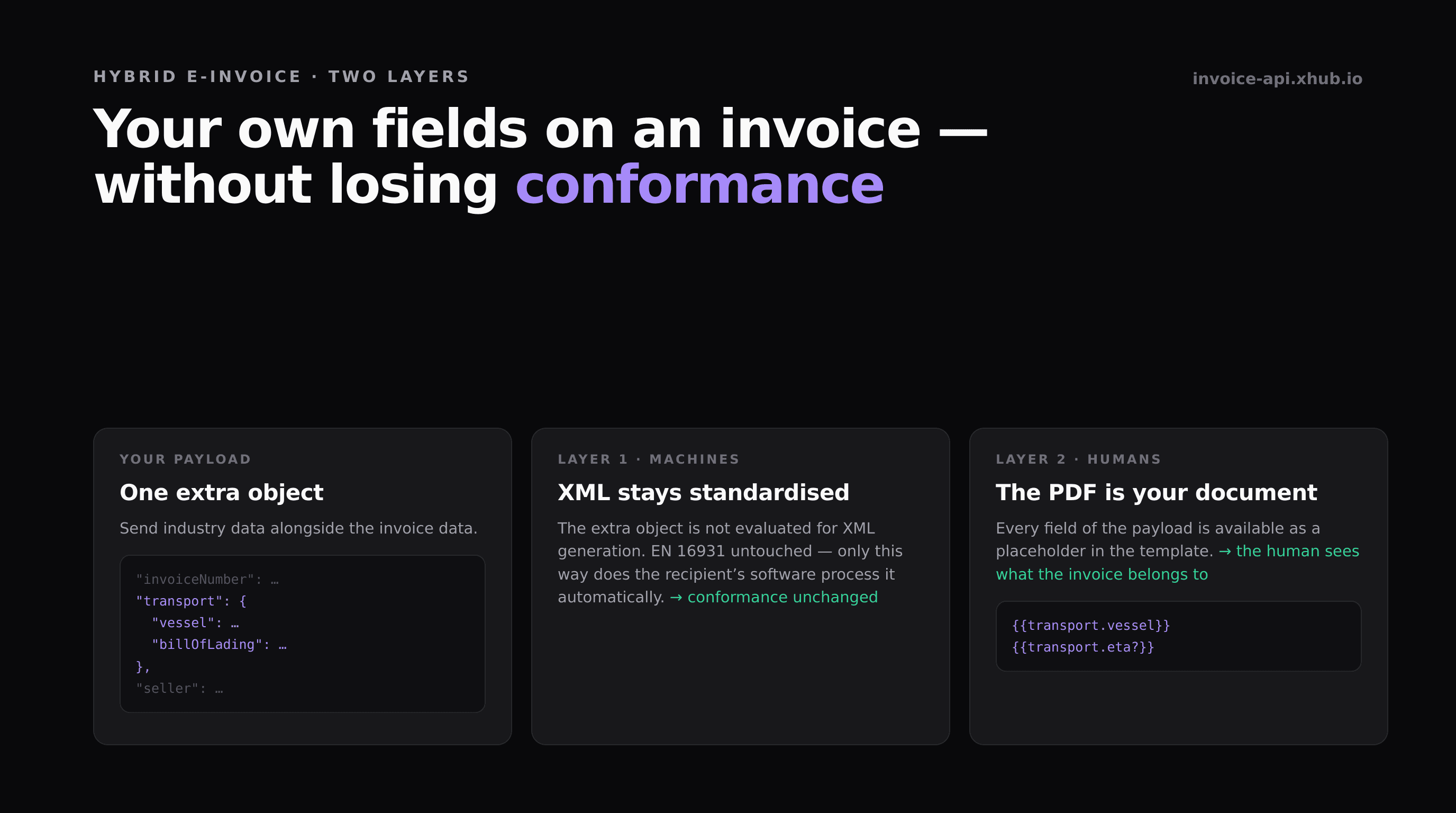
This is where the hybrid format gets interesting. A ZUGFeRD invoice — closely related to France's Factur-X — is a PDF/A-3 with the structured data embedded as XML. Two layers in one file, with different jobs:
The embedded XML is the machine-readable layer. Standardised to EN 16931, untouched. Only because it contains exclusively what the standard defines can the recipient's accounting software process the invoice automatically.
The PDF is the human-readable layer. That one is your document. Layout, logo, ordering, additional details — your call.
The sentence I've settled on for these conversations:
EN 16931 defines what every recipient must be able to process. Not what may appear on your invoice.
In practice: sending along extra data
At invoice-api.xhub it looks like this. You attach an additional object with your own details to the invoice data — here using transport data as the example:
1{2 "invoice": {3 "invoiceNumber": "RE-2026-0042",4 "type": "invoice",5 "issueDate": "2026-09-01",6 "dueDate": "2026-10-01",7 "currency": "EUR",8 9 "transport": {10 "vessel": "MV EXAMPLE",11 "voyage": "042",12 "billOfLading": "BL0000000000",13 "portOfLoading": "Sampleport",14 "portOfDischarge": "Exampletown",15 "eta": "2026-10-15",16 "packages": "32",17 "weightKg": "2658"18 },19 20 "seller": { "…": "…" },21 "buyer": { "…": "…" },22 "items": [ "…" ]23 }24}This object is not evaluated for XML generation. The ZUGFeRD data stays exactly as it would be without the addition — conformance is untouched.
Note: Invoice templates are currently in beta. Usable and documented, but the API may still change — the template documentation shows the current state.
Inside the PDF template, every field of the payload is available as a placeholder, nested ones with a dot:
1{{transport.vessel}}2{{transport.billOfLading}}3{{transport.portOfDischarge}}The natural home for a list like this is a keyvalue block:
1{2 "type": "keyvalue",3 "data": {4 "items": [5 { "label": "Vessel", "value": "{{transport.vessel}}" },6 { "label": "Voyage", "value": "{{transport.voyage}}" },7 { "label": "Bill of lading", "value": "{{transport.billOfLading}}" },8 { "label": "Port of discharge","value": "{{transport.portOfDischarge}}" },9 { "label": "ETA", "value": "{{transport.eta?}}" }10 ]11 }12}The question mark after eta marks the value as optional. Details that don't appear on every invoice then simply vanish instead of leaving an empty row. If you want the whole block to show only on certain invoices, attach a condition to it.
The full reference — all nine block types, design tokens, placeholders — is in the invoice template documentation.
Where the boundary runs
And now the part that's usually missing from articles like this one.
1. Plain XRechnung has no PDF
XRechnung is a pure XML file. There is no document to print anything onto — the file is the invoice. So the approach above works for the hybrid formats (ZUGFeRD, Factur-X), not for plain XRechnung.
If you invoice public sector bodies and have to deliver XRechnung, you have two options: use the fields the standard itself provides for references and notes — or find out whether the recipient needs those details in machine-readable form at all, or whether only a human reads them. Which fields are candidates is listed in the field reference.
2. What belongs in the XML belongs in the XML
Some things that look like industry data at first glance do have a place in the standard. The customer's purchase order number, for instance, or the buyer reference — in XRechnung the Leitweg-ID (the routing ID for German public authorities) travels in exactly that field.
Details like these belong in the fields designed for them, not in an extra object. Otherwise they appear on paper, but the recipient's software can't find them — and that software is the thing that's supposed to do the matching automatically.
Rule of thumb: if the recipient needs the detail machine-readable, first check whether the standard has a field for it. Only what finds no home there and is meant for a human belongs on the document layer.
3. The recipient only sees the PDF
Sounds obvious, gets confused anyway. The additional details do not land in the recipient's accounting software. They appear on the document somebody looks at. If your customer wants to pull the shipment number into their system automatically, the document layer is the wrong place — that's a conversation about the standard's reference fields.
The result
The recipient gets a conformant e-invoice that their accounting software processes automatically. And the same document shows the person looking at it which shipment, site or project it belongs to.
It isn't a compromise between conformance and practicality. It's two layers, built for exactly this case.
Where you stand, within one business day
If you carry details on your invoices that you assume the standard doesn't know: the fastest route to a reliable answer is a real invoice.
Send us a document from your system. We validate it against the same KoSIT schemas and business rules the recipient applies, and tell you within one business day what passes, what's missing and where each of your additional details belongs. Free of charge and without registration — the readiness check is here.
If you'd rather start yourself: the template documentation covers all block types and placeholders, and the playground lets you run a payload without an account.