The e-invoicing mandate 2025 poses challenges for many companies: How do I automatically validate incoming invoices? How do I detect faulty data? And what happens when the automated check finds problems?
In this article, I'll show you how to build an automated validation system with n8n and Invoice-api.xhub that solves exactly these problems -- without writing a single line of code.
💡 Looking for the n8n integration guide? Check out our complete n8n documentation with installation instructions, code examples, and ready-made workflow templates.
The Problem
Imagine you receive dozens of e-invoices from various suppliers every day. Each invoice must be:
- Formally validated (XRechnung-compliant, all mandatory fields present)
- Substantively checked (amounts are correct, VAT ID valid)
- Escalated when problems arise (notify staff)
- Archived (GoBD-compliant)
Doing this manually is time-consuming and error-prone. With the Invoice-api.xhub API and n8n, you can fully automate this process.
The Solution: Automated Validation Workflow
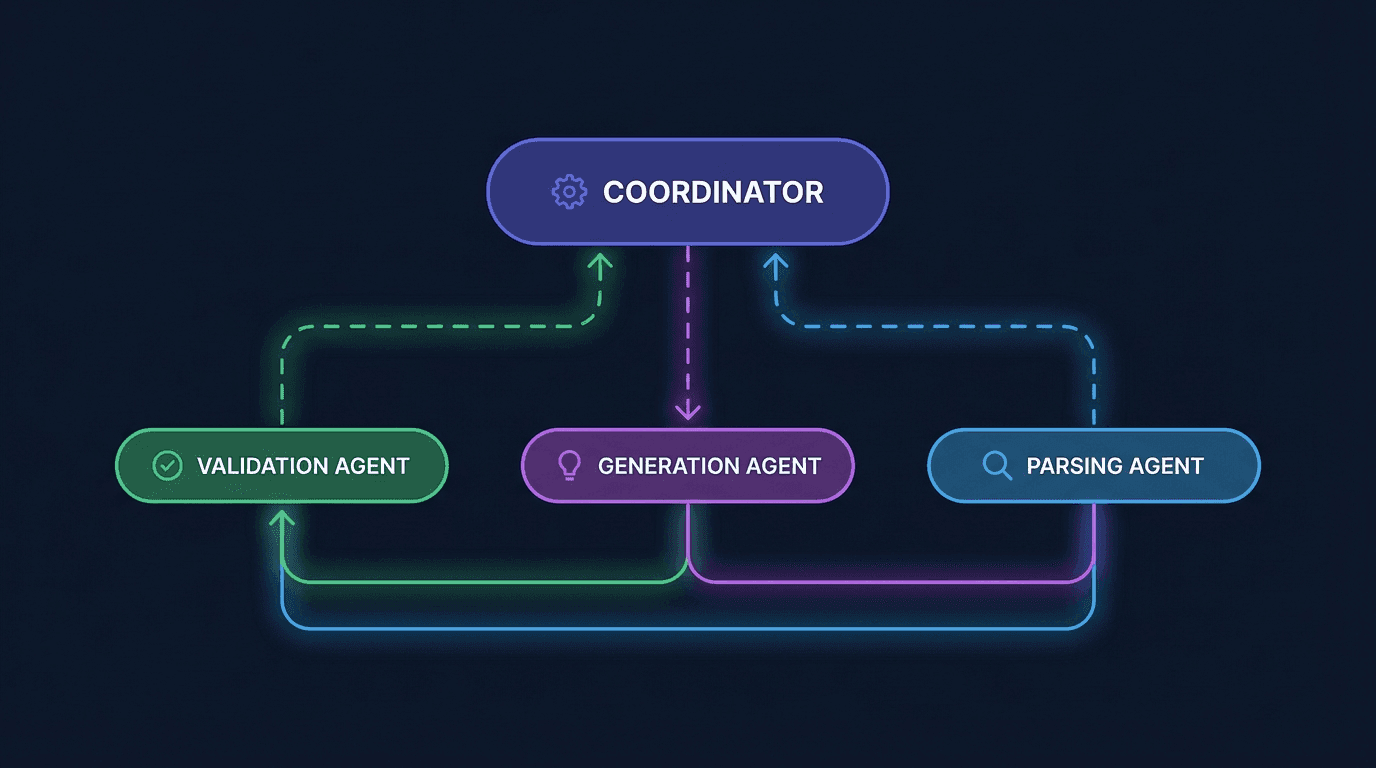
Our system uses specialized "agents" -- independent workflows that collaborate:
The 4 Agents
| Agent | Task |
|---|---|
| Coordinator | Receives requests, routes to specialized agents |
| Validation Agent | Checks invoices against XRechnung/ZUGFeRD schemas |
| Generation Agent | Creates e-invoices from text/JSON |
| Parsing Agent | Extracts data from PDFs/XMLs |
What Makes This System Special?
1. Schema Validation with Invoice-api.xhub
The heart of the system is the Validation Agent. It uses the Invoice-api.xhub API for comprehensive checks:
- Validates against official XRechnung/ZUGFeRD schemas
- Checks VAT IDs, calculations, mandatory fields
- Detects format and structural errors
- Provides detailed error messages with correction hints
The API gives you a clear status:
1{2 "valid": true,3 "errors": [],4 "warnings": [],5 "suggestions": []6}| Field | Description |
|---|---|
valid | true or false -- validation result |
errors | List of errors |
warnings | Warnings (not critical) |
suggestions | Improvement suggestions |
2. Human-in-the-Loop
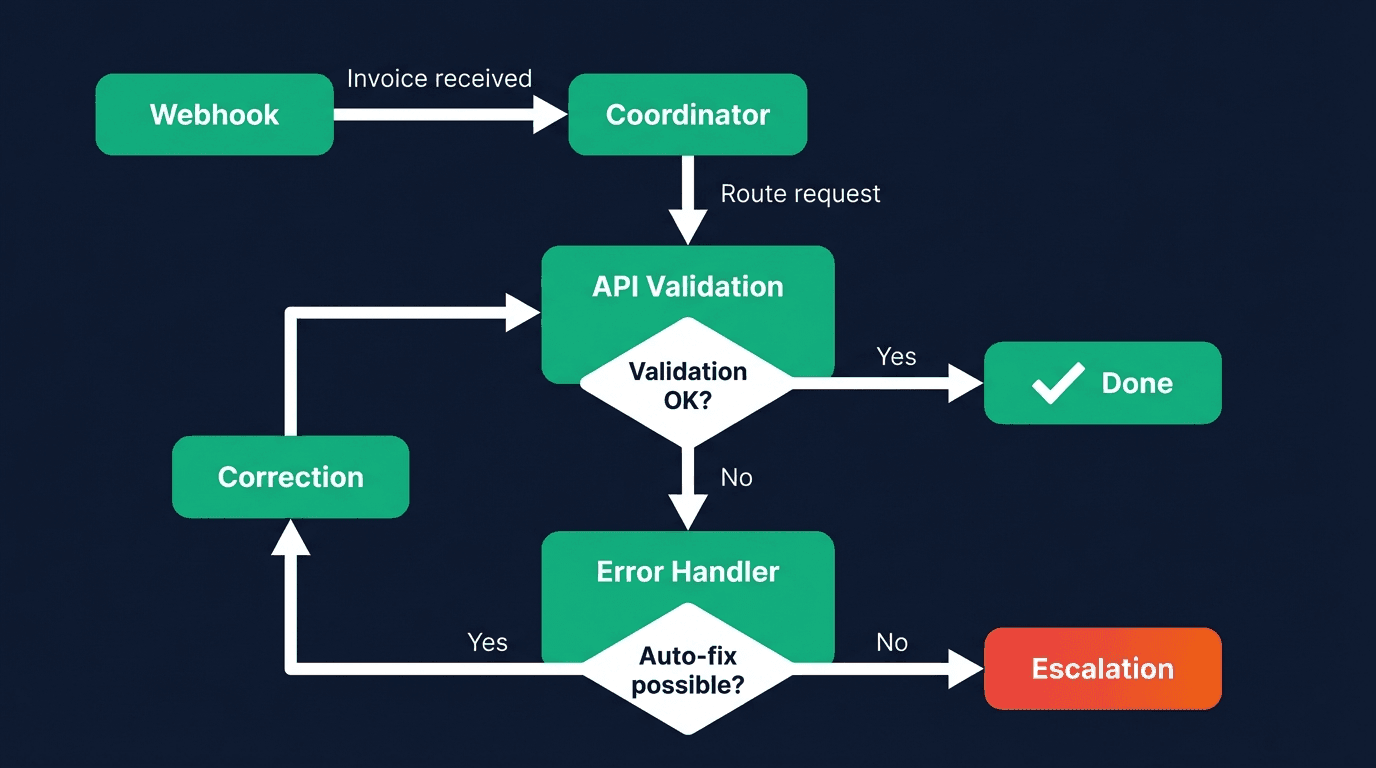
Critical errors are automatically escalated:
- Slack message to the responsible team member
- Request ID for tracking
- Error details and correction suggestions
This keeps humans in control without having to manually review every invoice.
3. Automatic Error Diagnosis
The Error Handler Agent analyzes errors in a structured way:
1{2 "diagnosis": {3 "rootCause": "VAT ID format invalid",4 "classification": "validation",5 "severity": "medium"6 },7 "autoFix": {8 "possible": true,9 "action": "Correct format"10 }11}For simple errors, the system can even auto-correct.
Step-by-Step Setup
Step 1: Set Up n8n
Start n8n with Docker:
1docker run -it --rm \2 --name n8n \3 -p 5678:5678 \4 -v n8n_data:/home/node/.n8n \5 n8nio/n8nThen install the Invoice-api.xhub Community Node:
- Settings → Community Nodes
- Search:
n8n-nodes-invoice-xhub - Install
Step 2: Configure Credentials
Create the following credentials in n8n:
| Credential | Value |
|---|---|
| Invoice-api.xhub API | Your API key (sk_test_... or sk_live_...) |
| Slack | Bot Token (optional for escalations) |
Step 3: Create the Workflow
The basic workflow has 5 nodes:
1Webhook → Extract Parameters → Invoice-api.xhub Validate → Build Response → Respond- Webhook: Receives POST requests on
/validate-invoice - Set Node: Extracts
invoiceandcountryCode - Invoice-api.xhub Node: Validates the invoice
- Code Node: Builds the response
- Respond to Webhook: Sends the result back
Step 4: Error Handling & Escalation
Add an IF Node:
- Condition:
{{ $json.validation.valid === false }} - True path: Error handling and optionally Slack notification
- False path: Send response directly
Live Example: Validate an Invoice
Send a test invoice:
1curl -X POST https://service.invoice-api.xhub.io/api/v1/invoice/de/validate \2 -H "Authorization: Bearer sk_test_xxx" \3 -H "Content-Type: application/json" \4 -d '{5 "invoice": {6 "invoiceNumber": "INV-2025-001",7 "type": "invoice",8 "issueDate": "2025-01-15",9 "dueDate": "2025-02-14",10 "currency": "EUR",11 "seller": {12 "name": "ACME GmbH",13 "vatId": "DE123456789",14 "street": "Hauptstraße 1",15 "city": "Berlin",16 "postalCode": "10115",17 "countryCode": "DE"18 },19 "buyer": {20 "name": "Customer AG",21 "vatId": "DE987654321",22 "street": "Nebenstraße 2",23 "city": "München",24 "postalCode": "80331",25 "countryCode": "DE"26 },27 "countrySpecific": { "countryCode": "DE", "buyerReference": "BUYER-REF-001" },28 "items": [29 {30 "position": 1,31 "description": "Consulting",32 "quantity": 10,33 "unit": "HUR",34 "unitPrice": 150.00,35 "taxRate": 19,36 "netAmount": 1500.00,37 "taxAmount": 285.00,38 "grossAmount": 1785.0039 }40 ],41 "subtotal": 1500.00,42 "total": 1785.00,43 "taxSummary": [{ "taxRate": 19, "netAmount": 1500.00, "taxAmount": 285.00 }],44 "paymentTerms": { "dueDays": 30 }45 }46 }'Response for a valid invoice:
1{2 "success": true,3 "validation": {4 "valid": true,5 "errors": [],6 "warnings": [],7 "suggestions": []8 }9}Response for an invalid invoice:
1{2 "success": true,3 "validation": {4 "valid": false,5 "errors": [6 {7 "code": "E001",8 "message": "VAT ID format invalid",9 "field": "seller.vatId",10 "suggestion": "Correct VAT ID format (DE + 9 digits)"11 }12 ],13 "warnings": []14 },15 "needsReview": true,16 "reviewReason": "Validation errors detected - review recommended"17}Import the Ready-Made Workflow
Want to get started right away? Import the ready-made workflow:
- Download
simple-validation-workflow.json - In n8n: Settings → Import Workflow
- Select the JSON file
- Assign credentials
- Activate
The complete multi-agent workflow with all 4 agents is also available.
Advantages of This Architecture
For Developers
- Modular: Each agent is an independent workflow
- Extensible: Easily add new agents
- Testable: Test and debug agents individually
For Companies
- Reliable: Official schema validation minimizes errors
- Transparent: Detailed error messages with correction hints
- Efficient: Only truly problematic cases are escalated
For Compliance
- Traceable: Every decision is documented
- Audit-ready: All validations are logged
- Up-to-date: Automatic schema updates via Invoice-api.xhub
Next Steps
- Install n8n and add the community node
- Get a free API key at Invoice-api.xhub.io
- Work through the tutorial with all details
- Go to production and save time
The complete tutorial with all code examples can be found in our documentation.
Get Started with n8n + Invoice-api.xhub
Ready to build your own e-invoice automation? Start with our n8n integration guide — install the community node in minutes and use our ready-made workflow templates.
Conclusion
With n8n and Invoice-api.xhub, you can build a production-ready validation system in just a few hours. The API provides reliable schema validation according to official standards -- fast and deterministic.
Questions? Contact us or try the API directly in the Playground.
Get started now -- the first 20 e-invoices per month are free.