
n8n Integration
Community Node AvailableOpen-source workflow automation with self-hosting option. Perfect for privacy-sensitive e-invoice workflows.


VIDEO WALKTHROUGH
Automate e-invoicing with n8n
Step by step: install the community node, add your API key, and generate XRechnung & ZUGFeRD straight from your n8n workflow.
Community Node Now Available
The official n8n-nodes-invoice-api-xhub Community Node is now available in the n8n Community Node Registry. Install it directly in n8n and start automating e-invoices immediately.
Ready-Made Workflow Templates
7 TemplatesProduction-ready n8n workflows for direct import. Each template includes JSON workflow, documentation, and example data.
Your departments write invoices in Word or Excel and send PDFs? Template 06 reads them from one mailbox per department and turns them into ZUGFeRD or XRechnung — no LLM involved. What typically fails along the way is in the guide From PDF invoice to e-invoice.
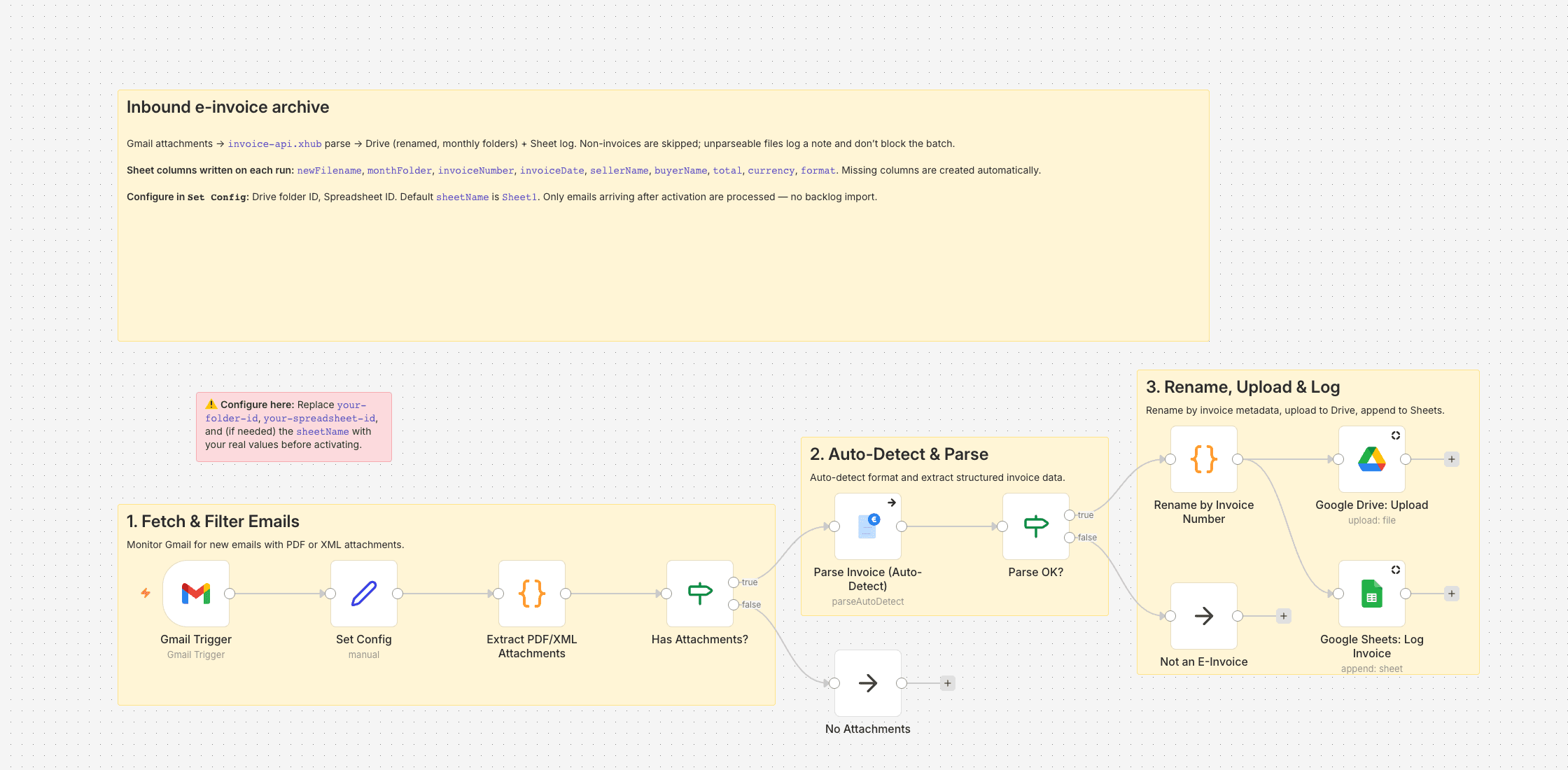
Archive inbound e-invoices from Gmail to Drive (with a searchable sheet log)
When our team passed 50 people, the supplier-invoice flow turned into a problem I couldn't keep ignoring. I'm Head of Finance at a software company; XRechnung XML from IT contractors, PDFs from the hosting provider, a…
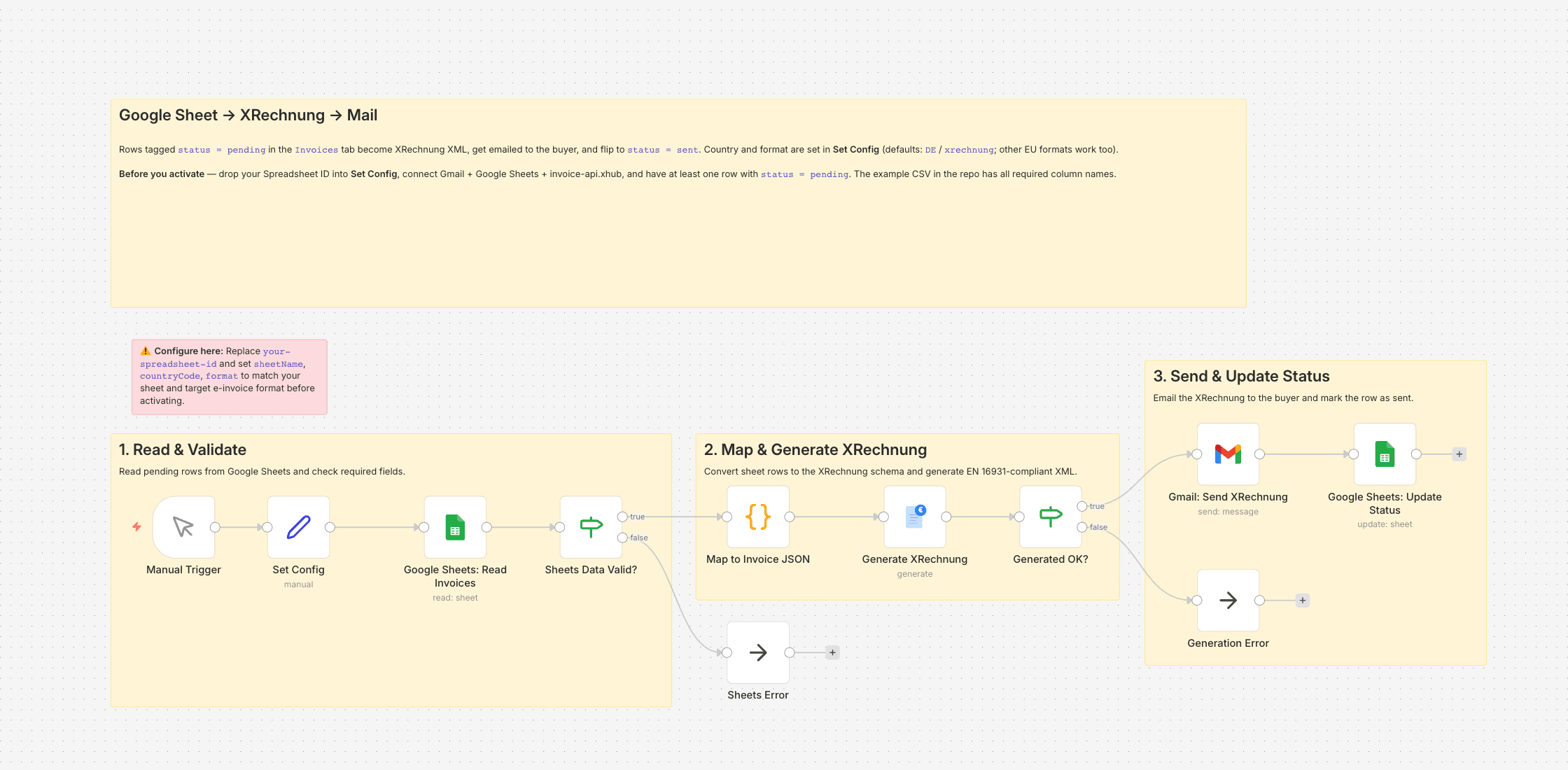
Turn a Google Sheet row into an XRechnung and email it
Since January 2025 our public-sector clients stopped accepting PDF invoices — they want XRechnung XML (EN 16931) or they don't pay. We're a four-person consultancy; I handle the admin side on top of my actual work, an…
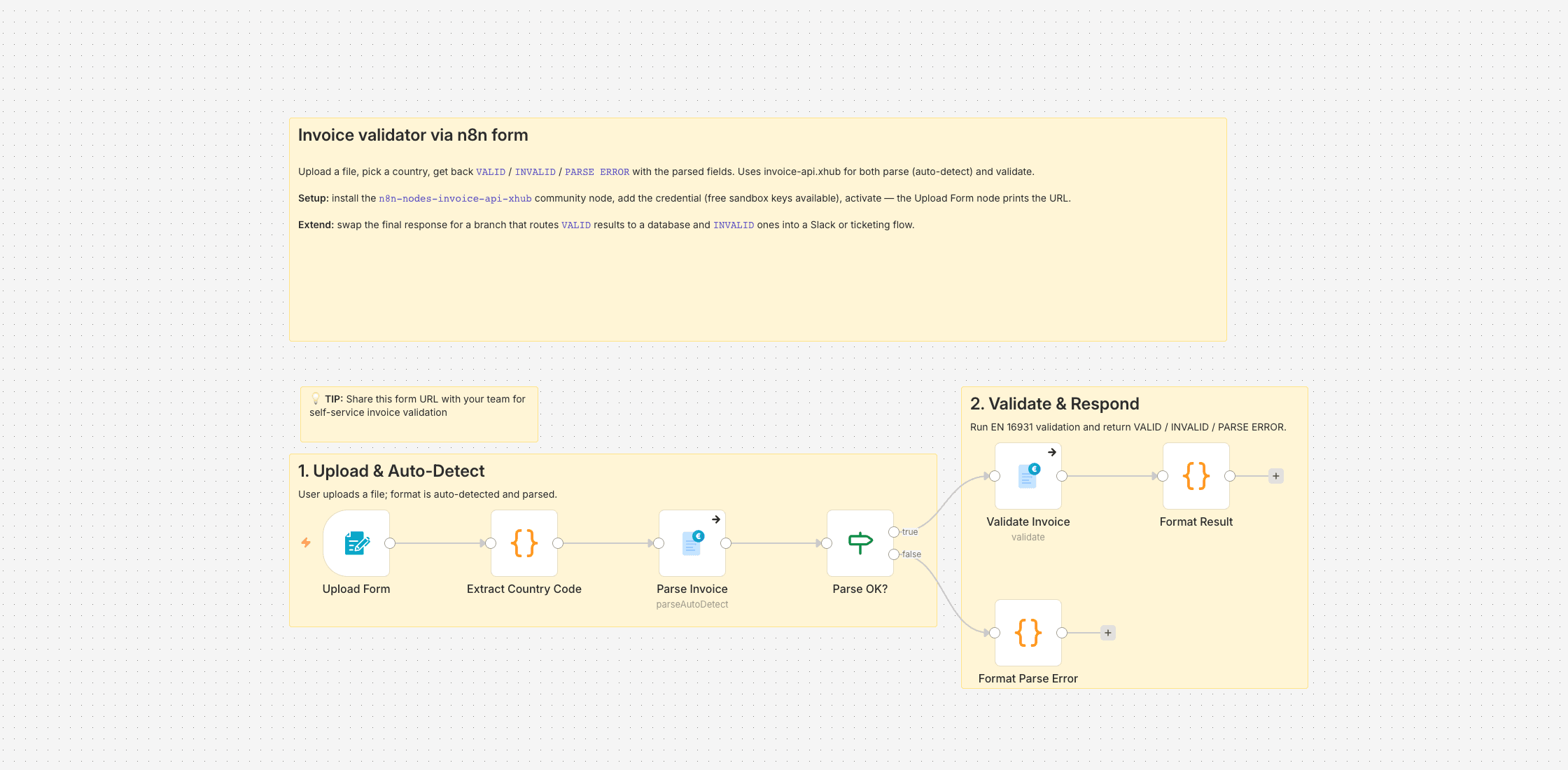
Self-service invoice validator (upload form)
I run n8n as the automation layer for a B2B online shop. Our suppliers send invoices in every shape we buy into — XRechnung XML, ZUGFeRD hybrids, plain PDFs. Before any downstream workflow (booking, reconciliation, pa…
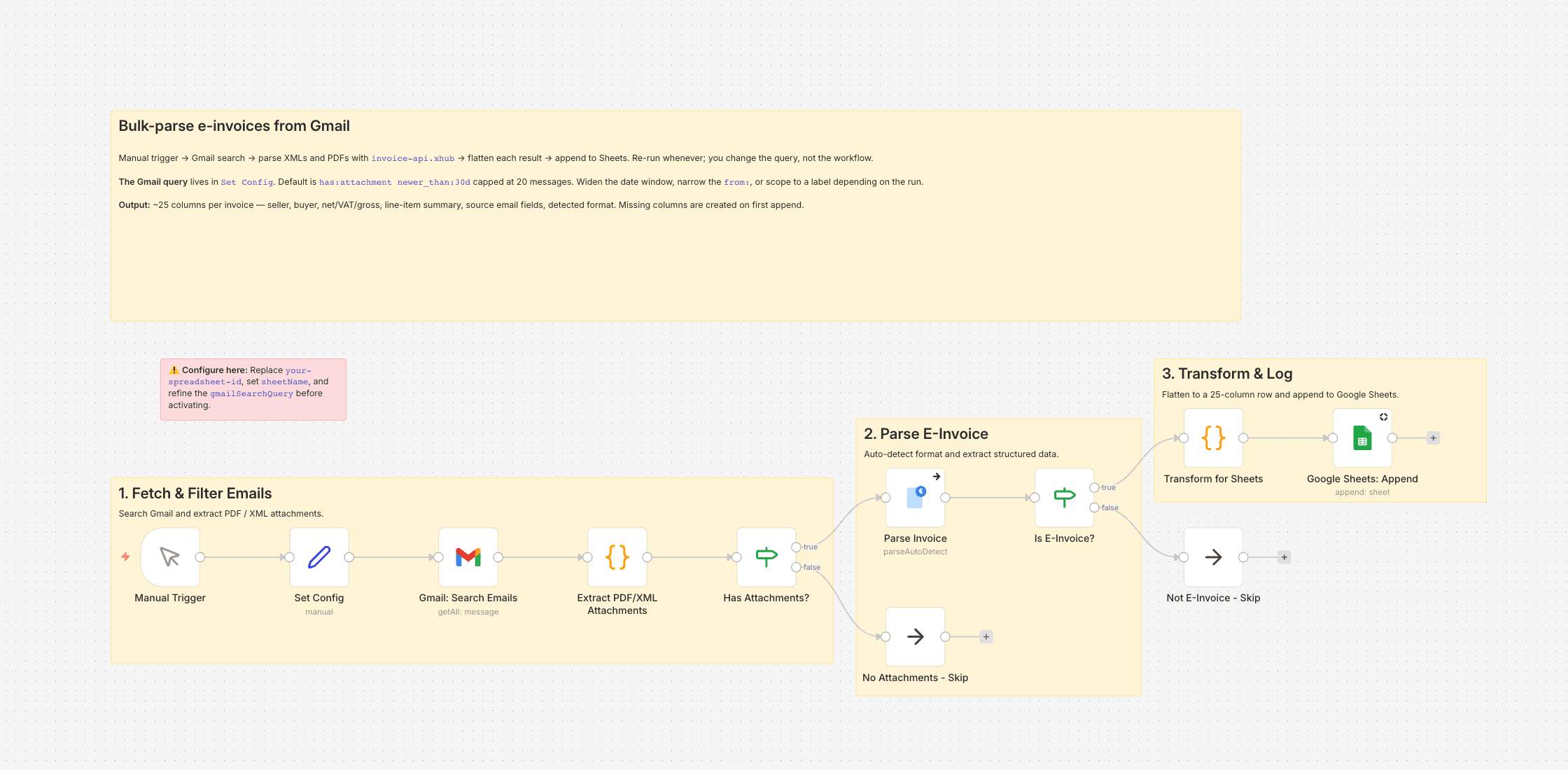
Bulk-parse inbound e-invoices from Gmail into a flat Google Sheet
Between Christmas and mid-January I was out for three weeks, and the supplier invoices for three of my clients had been stacking up in their inboxes — roughly a hundred and eighty attachments. I'm a freelance bookkeep…
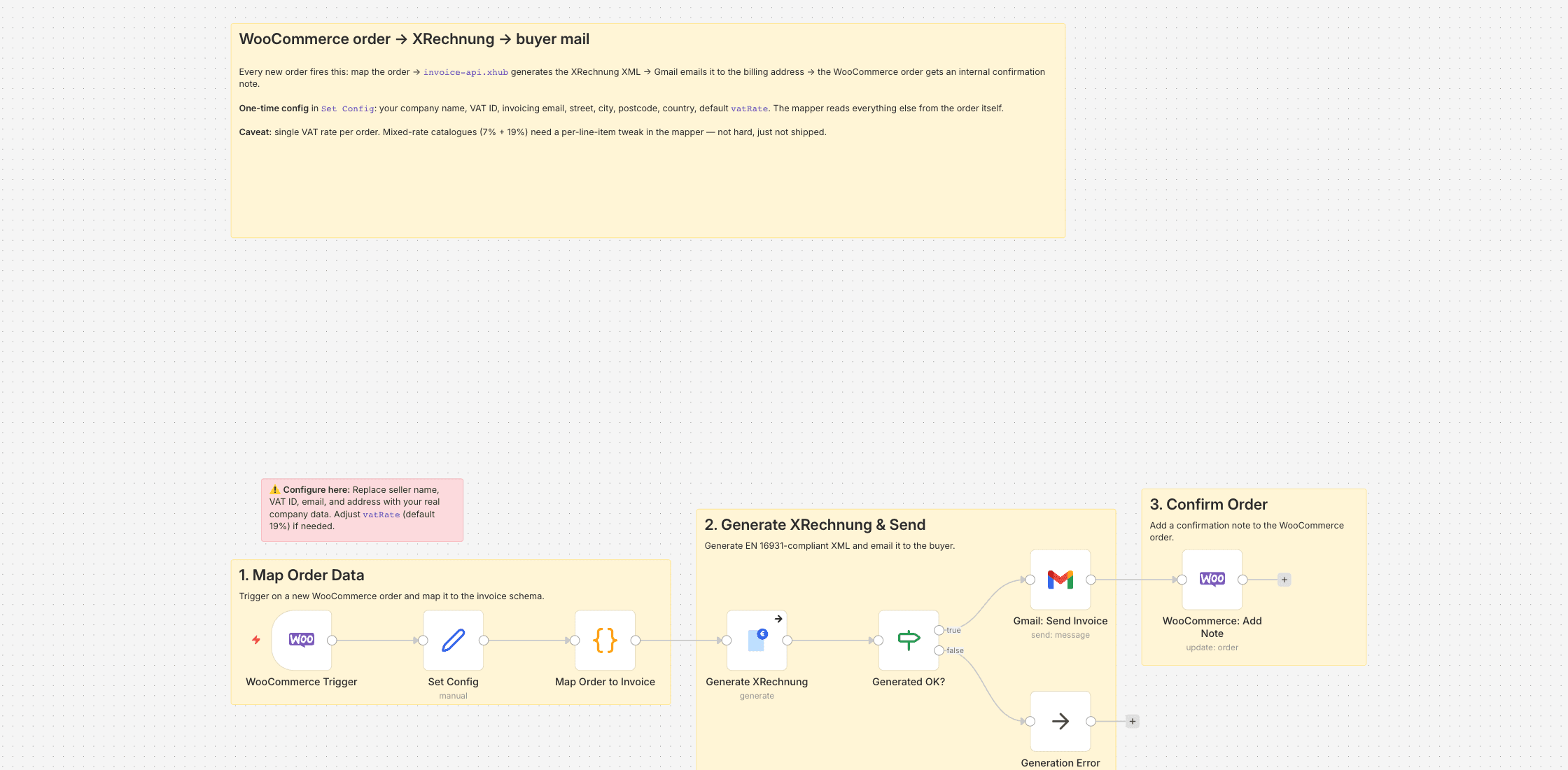
WooCommerce order → XRechnung → email the buyer, note the order
My shop sells lab consumables — pipette tips, reagent bottles, filter papers — mostly to university institutes, clinics, and the occasional research foundation. They're all publicly funded, and since early 2025 their …
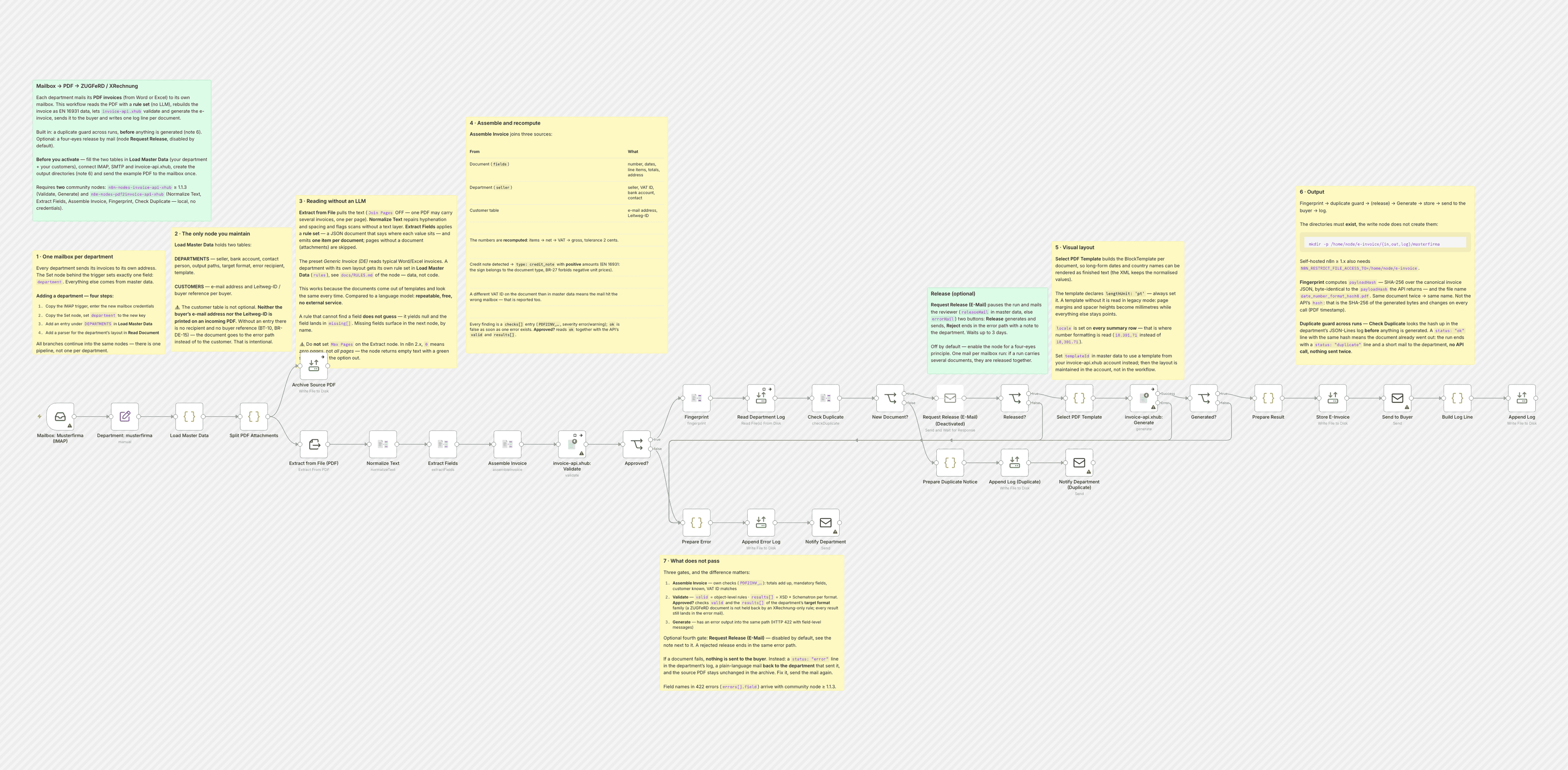
Turn the PDF invoices your departments already write into ZUGFeRD or XRechnung
I run the back office of a facility services company with two operating departments. Both write their invoices in Word — the same templates for fifteen years, tab stops and all — export to PDF and mail them out. When …
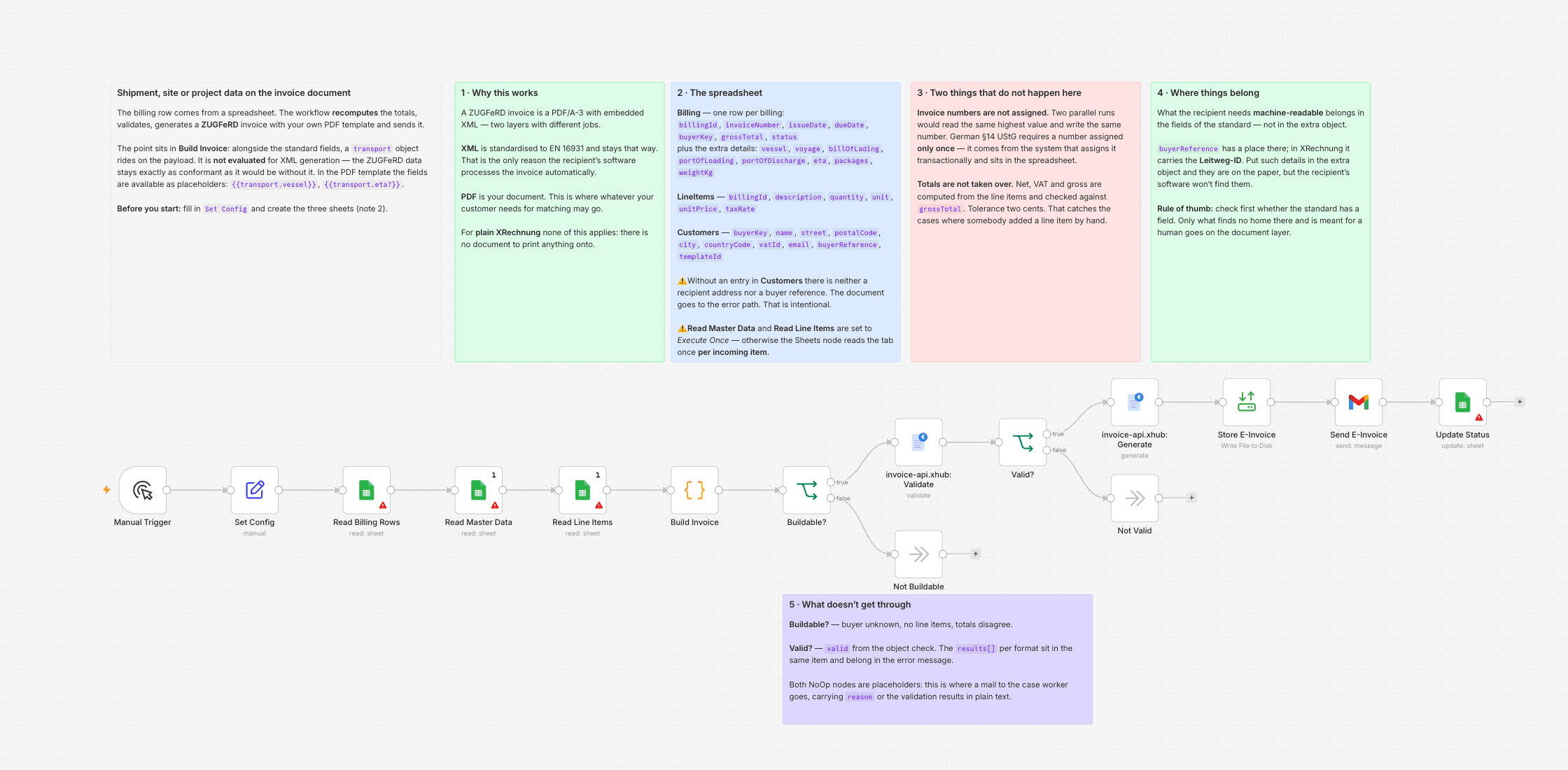
Put shipment, site or project data on the invoice document without breaking the e-invoice
We invoice ocean freight. Our invoices have always carried the vessel name, voyage number, bill of lading and port of discharge — not out of nostalgia, but because our customer's accounts payable has no way of telling…
What is n8n?
n8n is an open-source workflow automation tool — like Zapier or Make.com, but self-hostable and with full code access. With over 400 built-in integrations and community nodes, n8n is ideal for automating e-invoice workflows in privacy-sensitive environments.
Self-Hosted
Run on your own servers. Your invoice data never leaves your infrastructure.
No-Code / Low-Code
Visual workflow editor with drag & drop. Code when you need it.
Open Source
Fair-code licensed. Inspect, modify and extend as needed.
Quick Start
Get Started in 3 Steps
- 1
Install Community Node
Settings → Community Nodes → Search for
n8n-nodes-invoice-api-xhub - 2
Set Up Credentials
Enter API Key and Base URL in Invoice-api.xhub credentials
- 3
Add Node to Workflow
Add Invoice-api.xhub node and select operation
1# Installation via n8n UI:2# Settings → Community Nodes → Install3 4# Oder via npm (für selbst-gehostete Instanzen):5cd ~/.n8n/custom6npm install n8n-nodes-invoice-api-xhub7 8# n8n neu starten9# Der Node erscheint unter "Invoice-api.xhub" in der Node-ListeCredentials Setup
Create new credentials for the Invoice-api.xhub node:
Invoice-api.xhub APIAny name for identification
sk_test_xxxxxxxxxxxxTest key (sk_test_*) or live key (sk_live_*)
https://service.invoice-api.xhub.ioDefault API endpoint (pre-filled)
1// Credentials JSON Struktur2{3 "name": "Invoice-api.xhub API",4 "type": "invoiceXhubApi",5 "data": {6 "apiKey": "sk_test_xxxxxxxxxxxxxxxxxxxx",7 "baseUrl": "https://service.invoice-api.xhub.io"8 }9}10 11// API Key Formate:12// sk_test_* → Sandbox/Test-Umgebung13// sk_live_* → Produktions-Umgebung14 15// Den API Key findest du in der Console:16// https://console.invoice-api.xhub.ioNode Operations
The Invoice-api.xhub node offers 5 main operations for e-invoice processing.
Generate
Create e-invoice from JSON
Parameters
countryCode(options)– Country code (de, at, ch, fr, it, ...)format(options)– xrechnung, zugferd, facturx, fatturapa, ...invoiceData(json)– Invoice data as a JSON objectoutputBinary(boolean)– Return the document as binary (default: true)binaryPropertyName(string)– Name of the binary property (default: data)includeWarnings(boolean)– Include validation warningsformatOptions(json)– Format-specific options (e.g. template, profile)1// POST /api/v1/invoice/{countryCode}/{format}/generate2{3 "invoice": {4 "invoiceNumber": "INV-2025-001",5 "type": "invoice",6 "issueDate": "2025-01-15",7 "dueDate": "2025-02-14",8 "seller": {9 "name": "ACME GmbH",10 "vatId": "DE123456789",11 "street": "Hauptstraße 1",12 "city": "Berlin",13 "postalCode": "10115",14 "countryCode": "DE"15 },16 "buyer": {17 "name": "Customer AG",18 "vatId": "DE987654321",19 "street": "Musterweg 5",20 "city": "München",21 "postalCode": "80331",22 "countryCode": "DE"23 },24 "countrySpecific": { "countryCode": "DE", "buyerReference": "BUYER-REF-001" },25 "items": [{26 "position": 1,27 "description": "Beratung",28 "quantity": 10,29 "unit": "HUR",30 "unitPrice": 150.00,31 "taxRate": 19,32 "netAmount": 1500.00,33 "taxAmount": 285.00,34 "grossAmount": 1785.0035 }],36 "currency": "EUR",37 "subtotal": 1500.00,38 "total": 1785.00,39 "taxSummary": [{ "taxRate": 19, "netAmount": 1500.00, "taxAmount": 285.00 }],40 "paymentTerms": { "dueDays": 30 }41 }42}43 44// Response:45{46 "success": true,47 "format": "xrechnung",48 "filename": "INV-2025-001.xml",49 "mimeType": "application/xml",50 "hash": "8ae0d641dc2ea339602851ccd48f8adb0d0460873e20406b0ba1d7ff675917f3",51 "data": "PD94bWwgdmVyc2lvbj0i..."52}Parse
Extract data from XML/PDF with known format
Parameters
countryCode(options)– Country code (de, at, ch, fr, it, ...)format(options)– xrechnung, zugferd, facturx, fatturapa, ...inputType(options)– binary (from the previous node) or base64binaryPropertyName(string)– Name of the binary property (default: data)base64Data(string)– Base64-encoded document (when inputType=base64)1// POST /api/v1/invoice/de/xrechnung/parse2// Request: application/json3{4 "data": "<base64-encoded XML or PDF>",5 "filename": "rechnung.xml"6}7 8// Response:9{10 "success": true,11 "format": "XRECHNUNG_UBL",12 "hash": "8ae0d641dc2ea339602851ccd48f8adb0d0460873e20406b0ba1d7ff675917f3",13 "invoice": {14 "invoiceNumber": "INV-2025-001",15 "type": "invoice",16 "issueDate": "2025-01-15",17 "dueDate": "2025-02-14",18 "seller": { "name": "ACME GmbH", ... },19 "buyer": { "name": "Customer AG", ... },20 "items": [{ "position": 1, "description": "Beratung", ... }],21 "currency": "EUR",22 "subtotal": 1500.00,23 "total": 1785.0024 }25}Parse (Auto-Detect)
Automatic detection of country and format
Parameters
inputType(options)– binary (from the previous node) or base64binaryPropertyName(string)– Name of the binary property (default: data)base64Data(string)– Base64-encoded document (when inputType=base64)1// POST /api/v1/invoice/parse2// Request: application/json3{4 "data": "<base64-encoded XML or PDF>",5 "filename": "rechnung.xml"6}7 8// Response:9{10 "success": true,11 "hash": "8ae0d641dc2ea339602851ccd48f8adb0d0460873e20406b0ba1d7ff675917f3",12 "invoice": {13 "invoiceNumber": "INV-2025-001",14 "issueDate": "2025-01-15",15 ...16 },17 "detection": {18 "format": "XRECHNUNG_UBL",19 "formatVersion": "3.0.2",20 "countryCode": "DE",21 "confidence": 98,22 "formatMethod": "CUSTOMIZATION_ID",23 "countrySource": "DOCUMENT",24 "isAmbiguous": false,25 "alternativeCountries": []26 }27}Validate
Validate against country-specific rules
Parameters
countryCode(options)– Country code (de, at, ch, fr, it, ...)invoiceData(json)– Invoice data as a JSON objectfailOnErrors(boolean)– Mark the node as failed on errorsfailOnWarnings(boolean)– Mark the node as failed on warnings1// POST /api/v1/invoice/{countryCode}/validate2{3 "invoice": {4 "invoiceNumber": "INV-2025-001",5 "type": "invoice",6 "issueDate": "2025-01-15",7 ...8 }9}10 11// Response:12{13 "valid": true,14 "errors": [],15 "warnings": []16}Get Formats
Retrieve supported countries/formats
Parameters
scope(options)– all (every country) or country (a single country)countryCode(options)– Country code (de, at, ch, fr, it, ...)1// GET /api/v1/invoice/formats (scope: all)2// GET /api/v1/invoice/{countryCode}/formats (scope: country)3 4// Response (scope: all) — DE and AT of 37 countries:5{6 "countries": [7 {8 "code": "DE",9 "name": "Germany",10 "label": "Germany (DE)",11 "formats": [12 "pdf",13 "xrechnung",14 "zugferd"15 ],16 "formatDetails": [17 {18 "code": "pdf",19 "label": "PDF",20 "kind": "pdf"21 },22 {23 "code": "zugferd",24 "label": "ZUGFeRD 2.3/2.4/2.5",25 "kind": "einvoice"26 },27 {28 "code": "xrechnung",29 "label": "XRechnung 3.0/3.0.2",30 "kind": "einvoice"31 }32 ]33 },34 {35 "code": "AT",36 "name": "Austria",37 "label": "Austria (AT)",38 "formats": [39 "pdf",40 "ebinterface",41 "ubl"42 ],43 "formatDetails": [44 {45 "code": "pdf",46 "label": "PDF",47 "kind": "pdf"48 },49 {50 "code": "ebinterface",51 "label": "ebInterface",52 "kind": "einvoice"53 },54 {55 "code": "ubl",56 "label": "UBL (Peppol BIS 3.0)",57 "kind": "einvoice"58 }59 ]60 }61 ]62}Why n8n?
Self-Hosted
Run n8n on your own infrastructure
Open Source
Fully open source under Fair-Code license
400+ Integrations
Native nodes for the most popular tools
Code-Capable
JavaScript/Python code directly in workflows
n8n vs Zapier vs Make vs Direct API
How does the n8n integration compare to other automation options?
| Feature | n8n + Invoice-api.xhub | Zapier | Make.com | Direct API |
|---|---|---|---|---|
| Native Invoice Node | — | — | ||
| Self-Hosted Option | — | — | ||
| No-Code Workflows | — | |||
| E-Invoice Formats | 14 | 14 | 14 | 14 |
| Countries | 37 | 37 | 37 | 37 |
| Open Source | — | — | — | |
| Automation Cost | Free (self-hosted) | From $20/mo | From $20/mo | Free (self-hosted) |
Multi-Agent Architecture
For complex scenarios: Build a system of specialized agents that work together.
Coordinator Agent
Receives requests and routes them to the appropriate specialized agent
Validation Agent
Validates invoices against official XRechnung/ZUGFeRD schemas
Generation Agent
Creates compliant e-invoices from JSON data
Error Handler Agent
Analyzes errors, attempts auto-fixes, or escalates to humans
Supported Formats
37 countries with various e-invoice formats are supported.
- AUAustraliaUBL (EN 16931)
- ATAustriaebInterface · UBL (EN 16931)
- BEBelgiumUBL (EN 16931) · Factur-X
- BGBulgariaUBL (EN 16931)
- CACanada
- CYCyprusUBL (EN 16931)
- CZCzechiaISDOC · UBL (EN 16931)
- DKDenmarkUBL (EN 16931)
- EEEstoniaUBL (EN 16931)
- FIFinlandUBL (EN 16931)
- FRFranceFactur-X · UBL (EN 16931)
- DEGermanyXRechnung · ZUGFeRD
- GRGreecemyDATA
- HUHungaryNAV Online Számla XML
- ISIcelandUBL (EN 16931)
- IEIrelandUBL (EN 16931)
- ITItalyFatturaPA
- JPJapanUBL (EN 16931)
- LVLatviaUBL (EN 16931)
- LILiechtensteinQR-Bill · UBL (EN 16931)
- LTLithuaniaUBL (EN 16931)
- LULuxembourgUBL (EN 16931)
- MTMaltaUBL (EN 16931)
- NLNetherlandsUBL (EN 16931)
- NZNew ZealandUBL (EN 16931)
- NONorwayUBL (EN 16931)
- OMOmanUBL (EN 16931)
- PLPolandUBL (EN 16931) · Peppol BIS UBL
- RORomaniaUBL (EN 16931) · Peppol BIS UBL
- SKSlovakiaUBL (EN 16931) · Peppol BIS UBL
- SISloveniaUBL (EN 16931)
- ESSpainFacturae · UBL (EN 16931)
- SESwedenUBL (EN 16931)
- CHSwitzerlandQR-Bill · ZUGFeRD
- AEUnited Arab EmiratesUBL (EN 16931)
- GBUnited KingdomUBL (EN 16931)
- USUnited States
Troubleshooting
Common problems and their solutions.
Get Started Now
Install the community node and automate your e-invoice workflows.
What works with n8n
Supported
- Community node for generation, validation and parsing
- Self-hostable — invoice data leaves your instance only for the API call
- Any trigger: webhook, database, email, cron
- Ready-made templates for recurring workflows
Limits
- Peppol dispatch is not available yet (planned 2027)
- The API sends no webhooks — the workflow is triggered by your own system, not by us
- Error handling and retry strategy belong in your workflow, not in the API
What it costs for your workflow
A n8n setup producing around 2,000 invoices per month fits the Starter plan at 23 € per month billed monthly, or 18 € per month billed annually.
All prices net, plus VAT · 20 % off when billed annually · Free tier without a credit card
All plansn8n — frequently asked
Does this work on a self-hosted n8n instance?
Yes, and that is the common case. The node calls the API over HTTPS; invoice data leaves your instance only for that single call and is not stored permanently.
How do I handle failed calls?
The validator names the rule that failed with its code (e.g. BR-DE-01). The usual shape is a retry branch for network errors and a separate branch for validation errors that flags the order for manual review — the latter do not fix themselves by retrying.
Does every validation count against my quota?
Generated invoices are API calls. Budget for validation runs during development if you are testing on the free tier.
Your question about n8n isn't listed? Ask directly
For agencies
If you build n8n shops for clients: this page is the explanation you can hand them. Get in touch for volume terms and joint projects.